cancel
Showing results for 
Search instead for 
Did you mean: 

The Power BI Data Visualization World Championships is back! It's time to submit your entry. Live now!

Reply
vishnuteja
Regular Visitor

Add Measure Column to Matrix

vishnuteja_0-1642739961424.png

I Just need to add only one measure at the end of Matrix but Measure is adding to each Column in the Matrix,

I tried the work-around with word-wrap but is there any other solution or suggestions . 

1 ACCEPTED SOLUTION
v-zhangti
Community Support
Community Support

Hi, @vishnuteja 


Are you trying to control the Total of the Matrix view using Measure? If this is the case, you can learn about the HASONEVALUE function. https://docs.microsoft.com/dax/hasonevalue-function-dax 


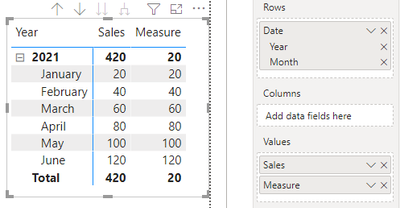
As an example, for the data shown in the figure, total defaults to sum, but I want to display the smallest value of it.

vzhangti_3-1643089953274.png

Measure = IF(HASONEVALUE('Table'[Sales]),SUM('Table'[Sales]),MIN('Table'[Sales]))

vzhangti_2-1643089926294.png

If the method I provided above can't solve your problem, what's your expected result? Can you provide a simple PBIX file for testing?


Best Regards,

Community Support Team _Charlotte

If this post helps, then please consider Accept it as the solution to help the other members find it more quickly.

View solution in original post

3 REPLIES 3
v-zhangti
Community Support
Community Support

Hi, @vishnuteja 


If the previous suggestions didn't solve your problem, can you provide a simple PBIX file for testing? And show what you expect the output to be. Looking forward to your response.


Best Regards,

Community Support Team _Charlotte

If this post helps, then please consider Accept it as the solution to help the other members find it more quickly.


v-zhangti
Community Support
Community Support

Hi, @vishnuteja 


Are you trying to control the Total of the Matrix view using Measure? If this is the case, you can learn about the HASONEVALUE function. https://docs.microsoft.com/dax/hasonevalue-function-dax 


As an example, for the data shown in the figure, total defaults to sum, but I want to display the smallest value of it.

vzhangti_3-1643089953274.png

Measure = IF(HASONEVALUE('Table'[Sales]),SUM('Table'[Sales]),MIN('Table'[Sales]))

vzhangti_2-1643089926294.png

If the method I provided above can't solve your problem, what's your expected result? Can you provide a simple PBIX file for testing?


Best Regards,

Community Support Team _Charlotte

If this post helps, then please consider Accept it as the solution to help the other members find it more quickly.

lbendlin
Super User
Super User

Leave the Column well empty, and only use the Values well. Consider using a table rather than a matrix. Consider using calculation groups. Consider creating a completely custom matrix.

Helpful resources

Announcements
Power BI DataViz World Championships

Power BI Dataviz World Championships

The Power BI Data Visualization World Championships is back! It's time to submit your entry.

January Power BI Update Carousel

Power BI Monthly Update - January 2026

Check out the January 2026 Power BI update to learn about new features.

FabCon Atlanta 2026 carousel

FabCon Atlanta 2026

Join us at FabCon Atlanta, March 16-20, for the ultimate Fabric, Power BI, AI and SQL community-led event. Save $200 with code FABCOMM.