Join us at FabCon Atlanta from March 16 - 20, 2026, for the ultimate Fabric, Power BI, AI and SQL community-led event. Save $200 with code FABCOMM.
Register now!Learn from the best! Meet the four finalists headed to the FINALS of the Power BI Dataviz World Championships! Register now
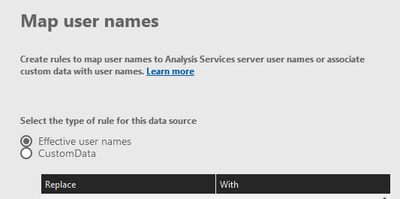
I am looking for a possibility to add user mappings to the PowerBI Gateway and the data sources. I know how to add with PowerShell users and the rights with Add-DataGatewayClusterDatasourceUser. Does somebody know of have a tip on how to do that for the user mapping?
Many thanks in advance.
Solved! Go to Solution.
Hi @dotnjet
Thanks for the clarification
Unfortunately you have to do this mapping manually, as far as I know there is no other way around it!
Yeah it can be rather painful!
Hi @dotnjet
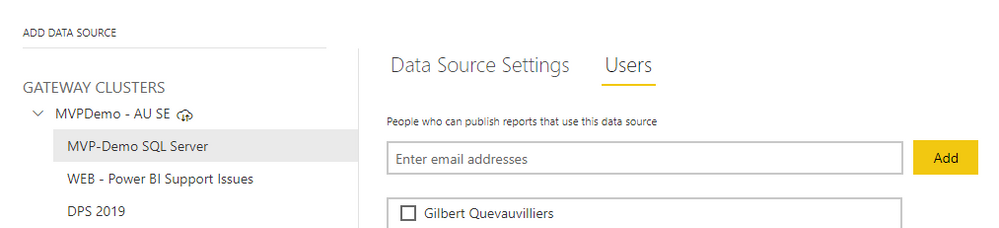
Do you mean adding users to the actual data source that you created?
If so you will need to go to the data source in the manage gateways and then click on users and add the users there?
Hi Gilbert
No that would not be a problem. I just need to add heaps of users which have for example a @onmicrosoft.com account and need to be mapped to the local domain user. david.tester@site.onmicrosoft.com = david.tester@contoso.local
It is the actual mapping I am talking about.
The user permissions I do anyway via SSAS.
Hi @dotnjet
Thanks for the clarification
Unfortunately you have to do this mapping manually, as far as I know there is no other way around it!
Many thanks! Bad news then ...
Share feedback directly with Fabric product managers, participate in targeted research studies and influence the Fabric roadmap.
Check out the February 2026 Power BI update to learn about new features.
| User | Count |
|---|---|
| 46 | |
| 43 | |
| 39 | |
| 25 | |
| 23 |