Get certified for free when you join Fabric Data Days 2026 and dive into Fabric, Power BI, SQL, AI, and other essential data skills.
Join nowData Days is here! Join us now for 60+ days of learning, challenges, and connection. Learn more
Hello,
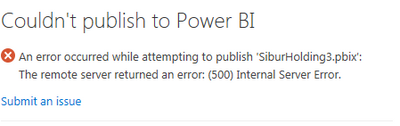
Not able to publish a report to the service. Keep getting The remote server returned an error: (500) Internal Server Error
The report was published and worked fine until a couple of weeks ago.
The report could be published neither via Power BI Desktop
nor Appservice -> Get Data - local file
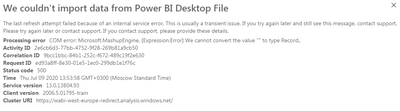
"COM error: Microsoft.MashupEngine, [Expression.Error] We cannot convert the value "" to type Record.."
Checked all M-expressions there is no error. All queries are refreshing without errors.
Solved! Go to Solution.
Hi @PaperPlanes ,
I found that the problem has been fixed, please try again.
If this post helps, then please consider Accept it as the solution to help the other members find it more quickly.
Best Regards,
Dedmon Dai
Hi @PaperPlanes ,
I found someone has open support ticket for the same issue. If it is fixed, I will let you know as soon as possible.
Best Regards,
Dedmon Dai
As I've told, I get
"COM error: Microsoft.MashupEngine, [Expression.Error] We cannot convert the value "" to type Record.."
error
Created a brand new PowerBI file, moved everything from the old one to the new one and was able to publish it successfully.
Logged into the Power BI service deleted the newly published report along with its dataset.
Tried to republish the same new report and got the same 500 Internal server error and wasn't able to publish it since.
cheers
Hi @PaperPlanes ,
I found that the problem has been fixed, please try again.
If this post helps, then please consider Accept it as the solution to help the other members find it more quickly.
Best Regards,
Dedmon Dai
I am getting this same error, however, i am able to publish the report to another premium workspace which leads me to think that the problem is not with the report but with the workspace (which is also premium). We've never had this problem in 3 years. Unfortunately I am not admin on the workspace, have any admin's encountered this problem? If so how was it solved?
Thank you
SCA01
Don't miss out on Data Days, June 15 through August 7. Learn Fabric, Power BI, SQL, AI and more.
Check out the May 2026 Power BI update to learn about new features.
| User | Count |
|---|---|
| 16 | |
| 10 | |
| 10 | |
| 8 | |
| 7 |
| User | Count |
|---|---|
| 40 | |
| 36 | |
| 35 | |
| 28 | |
| 20 |