Join us at FabCon Atlanta from March 16 - 20, 2026, for the ultimate Fabric, Power BI, AI and SQL community-led event. Save $200 with code FABCOMM.
Register now!Learn from the best! Meet the four finalists headed to the FINALS of the Power BI Dataviz World Championships! Register now
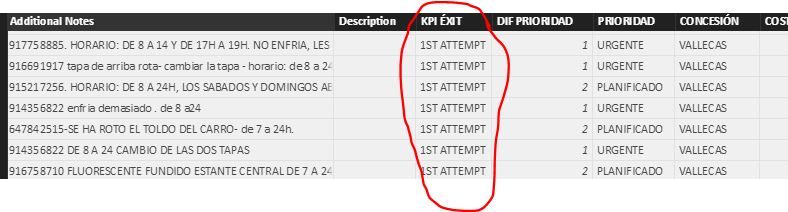
I Have the following query. I would like to calculate the average of 1st attempt of the column KPI EXIT. The thing is, every row has a diferent date like 1-01-2017. How can I get the average per month up to the date I want.
Hi @pbi1,
The [KPI EXIT] is a text column, how to calculate the average for "1st attempt"?
Based on my assumption, you want to calculate based on an other numeric field per month, right? If so, please create a column similar to below:
Average=CALCULATE(AVERAGE(TableName[Numeric Column]), FILTER(ALLEXCEPT(TableName,TableName[Date].Month), TableName[KPI EXIT]="1ST ATTEMPT"))
If I have something misunderstood, please provide more detailed data and show us your desired result.
Regards,
Yuliana Gu
Share feedback directly with Fabric product managers, participate in targeted research studies and influence the Fabric roadmap.
Check out the February 2026 Power BI update to learn about new features.
| User | Count |
|---|---|
| 3 | |
| 3 | |
| 1 | |
| 1 | |
| 1 |
| User | Count |
|---|---|
| 6 | |
| 5 | |
| 4 | |
| 3 | |
| 3 |