cancel
Showing results for 
Search instead for 
Did you mean: 

July 28 - August 9 | Final Round of the Power BI Dataviz World Championships. This is your chance. Learn more

Reply
DerMainzer
Resolver I
Resolver I

Report Builder Textfield multiple values

Hey,


I'm sure this is an easy one for you, but it's my first day with report builder:

I defined a parameter vor Names as e Text Value. I defined: Leave empty "" and the values come from a simple table with Names as you can see in the drop down.

The problems are:

1. Whatever I choose in the drop down the Report says #Error

2. If Í don't choose anything the Report Builder forces me to choose


REPORT.jpg


I have no idea what to do

1 ACCEPTED SOLUTION

Thank you very much and have a great weekend

View solution in original post

4 REPLIES 4
d_gosbell
Super User
Super User


@DerMainzer wrote:

1. Whatever I choose in the drop down the Report says #Error


This is because when you turn on the multiple values option the parameter returns an array instead of a single scalar value.


So instead of just referencing the parameter directly 

eg.

=Parameters!ReportParameter1.Value


You need to right click on the text box which is showing #Error then edit the expression to wrap the parameter reference in the Join() function. 

eg.

=Join(Parameters!ReportParameter1.Value,",")


@DerMainzer wrote:

2. If Í don't choose anything the Report Builder forces me to choose


If you want to allow people to run the report without selecting a value you need to configure a default value and you will also need to add this default value to your allowed values.

Hi,


thanks for your help - the Join did work.

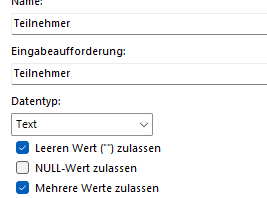
Unfortunately the default value I typed in doesn't show up, I think it's because it's not a value from the list the parameter is pointing at, right?. I also don't understand why there is a check box for "accept empty value" if it doesn't work....


DerMainzer_0-1678950271982.png


Thanks again,


Tim


@DerMainzer wrote:

Unfortunately the default value I typed in doesn't show up, I think it's because it's not a value from the list the parameter is pointing at, right?


Yes, unfortunately once you specify an allowed list then only values from that list are accepted. If you don't have an allowed list the user can type any text they like, but then you loose the multiple items option.


@DerMainzer wrote:

I also don't understand why there is a check box for "accept empty value" if it doesn't work....


It's conflicting with the Allowed Values property. If you also had an empty string as an allowed value it would work.

Thank you very much and have a great weekend

Helpful resources

Announcements
FabCon and SQLCon Barcelona 2026

FabCon & SQLCon – Barcelona 2026

Join us in Barcelona for FabCon and SQLCon, the Fabric, Power BI, SQL, and AI community event. Save €200 with code FABCMTY200.

Fabric Community Sticker Design Challenge Barcelona Carousel

Fabric Community Sticker Challenge - Barcelona 2026

If you love stickers, then you will definitely want to check out our community sticker challenge, Barcelona edition!

July Power BI Update Carousel

Power BI Monthly Update - July 2026

Check out the July 2026 Power BI update to learn about new features.

Power BI DataViz World Championships carousel

Power BI DataViz World Championships - June 2026

A new Power BI DataViz World Championship is coming this June! Don't miss out on submitting your entry.

Top Solution Authors