Get Fabric or SQL Certified for Free.
Get certified for free when you join Fabric Data Days 2026 and dive into Fabric, Power BI, SQL, AI, and other essential data skills.
Join now- Power BI forums
- Get Help with Power BI
- Desktop
- Service
- Report Server
- Power Query
- Mobile Apps
- Developer
- DAX Commands and Tips
- Custom Visuals Development Discussion
- Health and Life Sciences
- Power BI Spanish forums
- Translated Spanish Desktop
- Training and Consulting
- Instructor Led Training
- Dashboard in a Day for Women, by Women
- Galleries
- Data Stories Gallery
- Themes Gallery
- Contests Gallery
- QuickViz Gallery
- Quick Measures Gallery
- Visual Calculations Gallery
- Notebook Gallery
- Translytical Task Flow Gallery
- TMDL Gallery
- R Script Showcase
- Webinars and Video Gallery
- Ideas
- Custom Visuals Ideas (read-only)
- Issues
- Issues
- Events
- Upcoming Events
Try your skills in the Power BI Dataviz World Championship! Round one ends June 26. Join now
- Power BI forums
- Forums
- Get Help with Power BI
- Report Server
- Re: MySQL Authentification Error with On Premises ...
- Subscribe to RSS Feed
- Mark Topic as New
- Mark Topic as Read
- Float this Topic for Current User
- Bookmark
- Subscribe
- Printer Friendly Page

- Mark as New
- Bookmark
- Subscribe
- Mute
- Subscribe to RSS Feed
- Permalink
- Report Inappropriate Content
MySQL Authentification Error with On Premises Data Gateway
Hi everybody,
Very frustrating issue and I can't find the same exact issue anywhere else.
I have a MySQL connection which works fine on Desktop, but on PBI Online, when using On premises data gateway it gives me an Authentification Error (code : -2147467259).
The gateway is running well, as we are using it already with Power Automate and Power Apps. But when I try to configure the data source to the gateway, it doesn't recognize my authentification (method : Basic, username + password).
Am I missing something ?
Thank you for the help!
Antonio
Solved! Go to Solution.
- Mark as New
- Bookmark
- Subscribe
- Mute
- Subscribe to RSS Feed
- Permalink
- Report Inappropriate Content
Hello everyone,
I opened a support ticket and the Microsoft Support Team found a solution to this problem. Here's what we had to do :
- On Power BI Desktop :
- Clear cache and then cleared permission from data source settings.
- refresh and put all the credentials again
- Publish it to the service.
- On the online service :
- Add new datasource to the gateway (with old UI link, so that credentials are not required: https://app.powerbi.com/groups/me/gateways?newManageGatewaysUI=false) and gave same privacy level as power bi desktop.
Online refresh worked fine after that.
Antonio


- Mark as New
- Bookmark
- Subscribe
- Mute
- Subscribe to RSS Feed
- Permalink
- Report Inappropriate Content
Hi @Anonymous ,
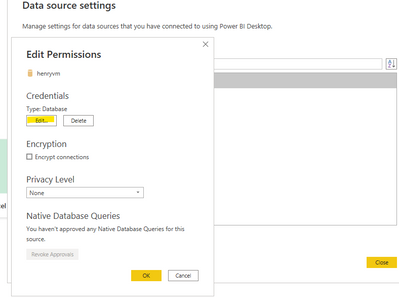
Or you can also try going to File|Options and Settings|Data Source Settings and Edit Data Source. Change the credentials to database credentials instead of Windows credentials, then republish.
Refer to the following related blog entry:
To Amend, Purpose and Bill – Text Analytics and the US Congress (linkedin.com)
Connecting MySQL to Power BI: A Comprehensive Guide (hevodata.com)
If the problem is still not resolved, please provide detailed error information and let me know immediately. Looking forward to your reply.
Best Regards,
Henry
If this post helps, then please consider Accept it as the solution to help the other members find it more quickly.
- Mark as New
- Bookmark
- Subscribe
- Mute
- Subscribe to RSS Feed
- Permalink
- Report Inappropriate Content
Hello,
Thanks for your answer.
I already had permissions set to database credentials.
The error occurs when trying to connect the data source to the gateway. Even when I set "Skip Test Connection", when I force a refresh online this is the error that I have :
- Underlying error code: -2147467259
- Underlying error message: The credentials provided for the MySql source are not valid.
It seems to be a problem of credentials, but I'm sure I have put the right username/password combination.
Thanks a lot for your help!
All the best,
Antonio


- Mark as New
- Bookmark
- Subscribe
- Mute
- Subscribe to RSS Feed
- Permalink
- Report Inappropriate Content
Long standing issue. MySQL and Microsoft blame each other. We have a dedicated gateway with an ancient version (66.8) solely for MySQL refreshes.
- Mark as New
- Bookmark
- Subscribe
- Mute
- Subscribe to RSS Feed
- Permalink
- Report Inappropriate Content
Hi,
Thanks for that answer. So it does work with the ancient version ? Do you know where I can find it ?
Thanks again,
Antonio
- Mark as New
- Bookmark
- Subscribe
- Mute
- Subscribe to RSS Feed
- Permalink
- Report Inappropriate Content
- Mark as New
- Bookmark
- Subscribe
- Mute
- Subscribe to RSS Feed
- Permalink
- Report Inappropriate Content
There is no version 66.8 in this page...
- Mark as New
- Bookmark
- Subscribe
- Mute
- Subscribe to RSS Feed
- Permalink
- Report Inappropriate Content
Send me a private message with your email.
- Mark as New
- Bookmark
- Subscribe
- Mute
- Subscribe to RSS Feed
- Permalink
- Report Inappropriate Content
Hello everyone,
I opened a support ticket and the Microsoft Support Team found a solution to this problem. Here's what we had to do :
- On Power BI Desktop :
- Clear cache and then cleared permission from data source settings.
- refresh and put all the credentials again
- Publish it to the service.
- On the online service :
- Add new datasource to the gateway (with old UI link, so that credentials are not required: https://app.powerbi.com/groups/me/gateways?newManageGatewaysUI=false) and gave same privacy level as power bi desktop.
Online refresh worked fine after that.
Antonio

- Mark as New
- Bookmark
- Subscribe
- Mute
- Subscribe to RSS Feed
- Permalink
- Report Inappropriate Content
Thank You!
After one week of headache, this solution helped!
Rocko
Helpful resources

Data Days 2026
Don't miss out on Data Days, June 15 through August 7. Learn Fabric, Power BI, SQL, AI and more.

Power BI DataViz World Championships - June 2026
A new Power BI DataViz World Championship is coming this June! Don't miss out on submitting your entry.

| User | Count |
|---|---|
| 5 | |
| 1 | |
| 1 | |
| 1 | |
| 1 |


| User | Count |
|---|---|
| 3 | |
| 1 | |
| 1 | |
| 1 | |
| 1 |


