cancel
Showing results for 
Search instead for 
Did you mean: 

Join the FabCon + SQLCon recap series. Up next: Power BI, Real-Time Intelligence, IQ and AI, and Data Factory take center stage. All sessions are available on-demand after the live show. Register now

Reply
GabrielAngulo
New Member

Issue refreshing with incremental refreshing

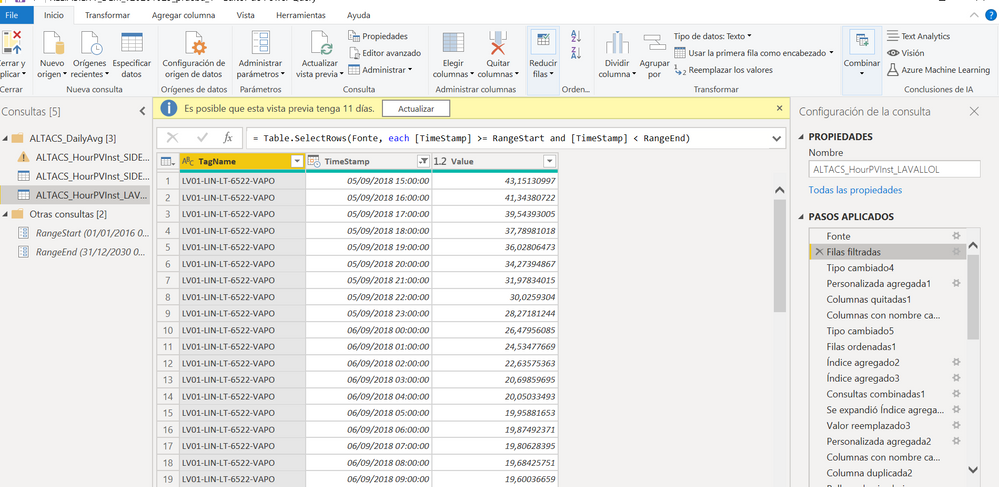
Hi community. I'm having an issue when I try to refresh my report. I've configurate incremental refresh with 2 differents tables.


When I apply to one of them, (it's a very simple table), wverithing is ok.


But when I try to apply to the second one, which is a little bit more complicated, having been modified in Power Query, then it fails.
44.PNG


The error message is as follows:


There was an error when processing the data in the dataset.

Please try again later or contact support. If you contact support, please provide these details.

  • Data source error{"error":{"code":"DM_GWPipeline_Gateway_MashupDataAccessError","pbi.error":{"code":"DM_GWPipeline_Gateway_MashupDataAccessError","parameters":{},"details":[{"code":"DM_ErrorDetailNameCode_UnderlyingErrorCode","detail":{"type":1,"value":"-2147467259"}},{"code":"DM_ErrorDetailNameCode_UnderlyingErrorMessage","detail":{"type":1,"value":"Erro durante a avaliação."}},{"code":"DM_ErrorDetailNameCode_UnderlyingHResult","detail":{"type":1,"value":"-2147467259"}}],"exceptionCulprit":1}}}
  • Cluster URIWABI-EUROPE-NORTH-B-redirect.analysis.windows.net
  • Activity ID3f16c325-22fb-4dd1-9b45-cbde1e8266e7
  • Request ID433f383a-fd9c-7522-67cc-0229ab5acd6d
  • Time2020-11-05 19:03:56Z

I don't know where is the problem. When I go to settings and see parameters, it seems like it doesn't recognized what I've configured in Desktop version.


Any idea what could be happening? 


Thanks in advance

1 REPLY 1
lbendlin
Super User
Super User

where does the error appear, in Power BI Desktop during "Close and Apply"  or when you refresh? Or in the service?


Note: Your RangeStart and RangeEnd parameter values are wildly unhelpful.  You are supposed to choose a narrow date range that is just enough for development work. These default values have nothing to do with how the final result on the service looks.

Helpful resources

Announcements
April Power BI Update Carousel

Power BI Monthly Update - April 2026

Check out the April 2026 Power BI update to learn about new features.

New to Fabric survey Carousel

New to Fabric Survey

If you have recently started exploring Fabric, we'd love to hear how it's going. Your feedback can help with product improvements.

Power BI DataViz World Championships carousel

Power BI DataViz World Championships - June 2026

A new Power BI DataViz World Championship is coming this June! Don't miss out on submitting your entry.

FabCon and SQLCon Highlights Carousel

FabCon &SQLCon Highlights

Experience the highlights from FabCon & SQLCon, available live and on-demand starting April 14th.