cancel
Showing results for 
Search instead for 
Did you mean: 

The Power BI Data Visualization World Championships is back! Get ahead of the game and start preparing now! Learn more

Reply
Anonymous
Not applicable

How to reference a specific cell in a table of the report builder to build an expression

Hi, 


As I didn't get any traction with my previous question, I'm trying to build my percentage calculation inside the report builder directly. 


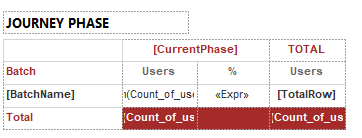
This is my table: 
Alienvolm_0-1620359145879.png

In the "%" column, I would like to create a simple expression that divides the value under the first "Users" column by the value under the second "Users" column. 

How do I reference those two cells in an expression? 


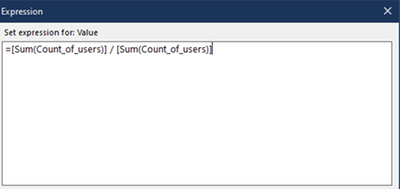
If I copy the content of the cells I get this (which makes every value 100%): 
Alienvolm_1-1620359345097.png


If I assign a name to the cells in the Text Box properties as below and then I use those names in the expression, I get another error: 

Alienvolm_3-1620359709986.png


Alienvolm_2-1620359601813.png


And the same happens if I assign a label. 


How can I reference these two cells to build a calculation in the report builder? Or, how do I declare those values? 


Thank you in advance for your suggestions. 


1 ACCEPTED SOLUTION
AbhiSSRS
Solution Sage
Solution Sage

What expression are you building for the textbox names? 

It should be like :


=ReportItems!CountofUsers0.Value/ReportItems!CountofUsers1.Value


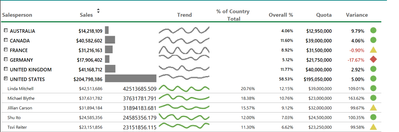
eg in this report : 

In Variance column I have put below expression and that works fine :

=ReportItems!Sales.Value/ReportItems!Quota.Value

AbhiSSRS_0-1620372662021.png


View solution in original post

2 REPLIES 2
AbhiSSRS
Solution Sage
Solution Sage

What expression are you building for the textbox names? 

It should be like :


=ReportItems!CountofUsers0.Value/ReportItems!CountofUsers1.Value


eg in this report : 

In Variance column I have put below expression and that works fine :

=ReportItems!Sales.Value/ReportItems!Quota.Value

AbhiSSRS_0-1620372662021.png


Anonymous
Not applicable

Fixed!! 

Thank you SO much! 

Helpful resources

Announcements
November Power BI Update Carousel

Power BI Monthly Update - November 2025

Check out the November 2025 Power BI update to learn about new features.

Fabric Data Days Carousel

Fabric Data Days

Advance your Data & AI career with 50 days of live learning, contests, hands-on challenges, study groups & certifications and more!

FabCon Atlanta 2026 carousel

FabCon Atlanta 2026

Join us at FabCon Atlanta, March 16-20, for the ultimate Fabric, Power BI, AI and SQL community-led event. Save $200 with code FABCOMM.