cancel
Showing results for 
Search instead for 
Did you mean: 

The Power BI Data Visualization World Championships is back! Get ahead of the game and start preparing now! Learn more

Reply
Anonymous
Not applicable

How to reference a specific cell in a table of the report builder to build an expression

Hi, 


As I didn't get any traction with my previous question, I'm trying to build my percentage calculation inside the report builder directly. 


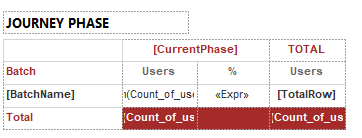
This is my table: 

Alienvolm_0-1620359145879.png

In the "%" column, I would like to create a simple expression that divides the value under the first "Users" column by the value under the second "Users" column. 

How do I reference those two cells in an expression? 


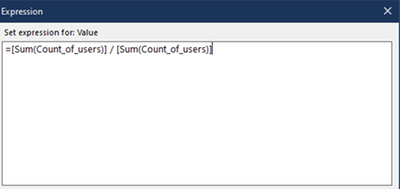
If I copy the content of the cells I get this (which makes every value 100%): 

Alienvolm_1-1620359345097.png


If I assign a name to the cells in the Text Box properties as below and then I use those names in the expression, I get another error: 

Alienvolm_3-1620359709986.png


Alienvolm_2-1620359601813.png


And the same happens if I assign a label. 


How can I reference these two cells to build a calculation in the report builder? Or, how do I declare those values? 


Thank you in advance for your suggestions. 


1 ACCEPTED SOLUTION
AbhiSSRS
Solution Sage
Solution Sage

What expression are you building for the textbox names? 

It should be like :


=ReportItems!CountofUsers0.Value/ReportItems!CountofUsers1.Value


eg in this report : 

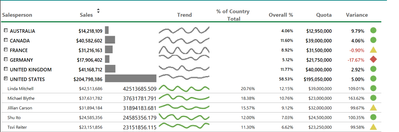
In Variance column I have put below expression and that works fine :

=ReportItems!Sales.Value/ReportItems!Quota.Value

AbhiSSRS_0-1620372662021.png


View solution in original post

2 REPLIES 2
AbhiSSRS
Solution Sage
Solution Sage

What expression are you building for the textbox names? 

It should be like :


=ReportItems!CountofUsers0.Value/ReportItems!CountofUsers1.Value


eg in this report : 

In Variance column I have put below expression and that works fine :

=ReportItems!Sales.Value/ReportItems!Quota.Value

AbhiSSRS_0-1620372662021.png


Anonymous
Not applicable

Fixed!! 

Thank you SO much! 

Helpful resources

Announcements
Power BI DataViz World Championships

Power BI Dataviz World Championships

The Power BI Data Visualization World Championships is back! Get ahead of the game and start preparing now!

December 2025 Power BI Update Carousel

Power BI Monthly Update - December 2025

Check out the December 2025 Power BI Holiday Recap!

FabCon Atlanta 2026 carousel

FabCon Atlanta 2026

Join us at FabCon Atlanta, March 16-20, for the ultimate Fabric, Power BI, AI and SQL community-led event. Save $200 with code FABCOMM.