Don't miss your chance to take the Fabric Data Engineer (DP-600) exam for FREE! Find out how by watching the DP-600 session on-demand now through April 28th.
Learn moreJoin the FabCon + SQLCon recap series. Up next: Power BI, Real-Time Intelligence, IQ and AI, and Data Factory take center stage. All sessions are available on-demand after the live show. Register now
Solved! Go to Solution.
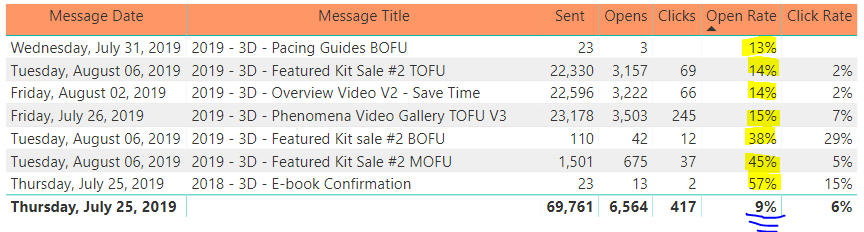
It's a bit hard to say without seeing some sample data, but maybe you could create an [Open Count] measure something like the following:
Open Count = SUMX(VALUES(Email_Activity[Message Title]),
CALCULATE (DISTINCTCOUNT (Email_Activity[Recipient E-mail] ) , Email_Activity[Opened] = 1)
)
Then your Open Rate measure would reference this measure
Open Rate = [Open Count] / SUM( Email_Activity[Sent] )
The problem centers around the distinctcount(). Why are you using distinctcount? Do you have multiple rows if someone opens an email twice?
If not and the grain of your Email_Activity table is just one row for each email that was sent, and you update the Opened flag when someone opens the email then could you just write your expression as follows
SUM(Email_Activity[Opened]) / SUM(Email_Activity[Sent])
If this does not work can you post a few rows of example data that show us why you need to do the distinctcount?
d_gosbell sorry for the late response, but yes I have multiple rows for each time a email address opens an email. Unfortuntely that is something I cannot change as part of the export. I also have 1 row for each time someone clicks on an email. Do you have any suggestions?
It's a bit hard to say without seeing some sample data, but maybe you could create an [Open Count] measure something like the following:
Open Count = SUMX(VALUES(Email_Activity[Message Title]),
CALCULATE (DISTINCTCOUNT (Email_Activity[Recipient E-mail] ) , Email_Activity[Opened] = 1)
)
Then your Open Rate measure would reference this measure
Open Rate = [Open Count] / SUM( Email_Activity[Sent] )
Check out the April 2026 Power BI update to learn about new features.
If you have recently started exploring Fabric, we'd love to hear how it's going. Your feedback can help with product improvements.
A new Power BI DataViz World Championship is coming this June! Don't miss out on submitting your entry.
| User | Count |
|---|---|
| 3 | |
| 3 | |
| 2 | |
| 2 | |
| 2 |
| User | Count |
|---|---|
| 6 | |
| 3 | |
| 3 | |
| 3 | |
| 3 |