cancel
Showing results for 
Search instead for 
Did you mean: 

The Power BI Data Visualization World Championships is back! Get ahead of the game and start preparing now! Learn more

Reply
emaxon
Frequent Visitor

Distinct Count By Group - Average

Hello,
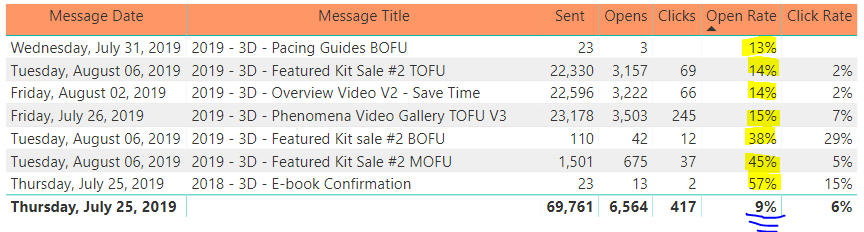
I am trying to find the unique open rate (count each email address once for each message it opens) for a set of messages. I can successfully see the unique open rate for each message stand alone; however when I try to aggregate it up to a set of messages it only count one email address ONCE (for all messages). Instead I want it to count that email address ONCE FOR EACH MESSAGE OPENED.
 
I used this measure formula to determine unique open rate for each message (stand alone).
U Open Rate = CALCULATE (DISTINCTCOUNT (Email_Activity[Recipient E-mail] ) , Email_Activity[Opened] = 1) / SUM(Email_Activity[Sent])
 
Just need some advice on how to get the aggrated (by each message) open rate. I figure there should be a GROUPBY() function or a SUMMARIZE function in there somehow. Please take a look at the photo below and thatmight make my question more clear (look at the highlighted and blue underlining).Capture.PNG
 
1 ACCEPTED SOLUTION

It's a bit hard to say without seeing some sample data, but maybe you could create an [Open Count] measure something like the following:


Open Count = SUMX(VALUES(Email_Activity[Message Title]), 
CALCULATE (DISTINCTCOUNT (Email_Activity[Recipient E-mail] ) , Email_Activity[Opened] = 1)
)

Then your Open Rate measure would reference this measure


Open Rate = [Open Count] / SUM( Email_Activity[Sent] )

View solution in original post

3 REPLIES 3
d_gosbell
Super User
Super User

The problem centers around the distinctcount(). Why are you using distinctcount? Do you have multiple rows if someone opens an email twice? 


If not and the grain of your Email_Activity table is just one row for each email that was sent, and you update the Opened flag when someone opens the email then could you just write your expression as follows


SUM(Email_Activity[Opened]) / SUM(Email_Activity[Sent])


If this does not work can you post a few rows of example data that show us why you need to do the distinctcount?

d_gosbell sorry for the late response, but yes I have multiple rows for each time a email address opens an email. Unfortuntely that is something I cannot change as part of the export. I also have 1 row for each time someone clicks on an email. Do you have any suggestions? 

It's a bit hard to say without seeing some sample data, but maybe you could create an [Open Count] measure something like the following:


Open Count = SUMX(VALUES(Email_Activity[Message Title]), 
CALCULATE (DISTINCTCOUNT (Email_Activity[Recipient E-mail] ) , Email_Activity[Opened] = 1)
)

Then your Open Rate measure would reference this measure


Open Rate = [Open Count] / SUM( Email_Activity[Sent] )

Helpful resources

Announcements
Power BI DataViz World Championships

Power BI Dataviz World Championships

The Power BI Data Visualization World Championships is back! Get ahead of the game and start preparing now!

December 2025 Power BI Update Carousel

Power BI Monthly Update - December 2025

Check out the December 2025 Power BI Holiday Recap!

FabCon Atlanta 2026 carousel

FabCon Atlanta 2026

Join us at FabCon Atlanta, March 16-20, for the ultimate Fabric, Power BI, AI and SQL community-led event. Save $200 with code FABCOMM.