cancel
Showing results for 
Search instead for 
Did you mean: 

The Power BI Data Visualization World Championships is back! Get ahead of the game and start preparing now! Learn more

Reply
Raymo3u99
Helper I
Helper I

Comparing values from 2 different selections

I have a table with the following columns:


Product, Date, Cost


I want to be able to have two slicers showing product. User can select a product from each slicer and I need to compare the cost of the two products by date.


Example:


Oil  1/1/2019  2.00

Gas 1/1/2019  1.50

Tea  1/1/2019  0.50

Oil  2/1/2019  2.10

Gas 2/1/2019  1.60

Tea  2/1/2019  0.60

Oil  3/1/2019  2.30

Gas 3/1/2019  1.90

Tea  3/1/2019  1.00


I want two slicers both showing Oil, Gas and Tea.


If user selects say Oil from one and Gas from the other, then output Graph should show


Dates as the X Coordinate, Price as the Y coordinate and bars for Oil and Gas for each date. I would also like to be able to calculate the variance between Oil price and Gas price for each date.


1 ACCEPTED SOLUTION
d_gosbell
Super User
Super User

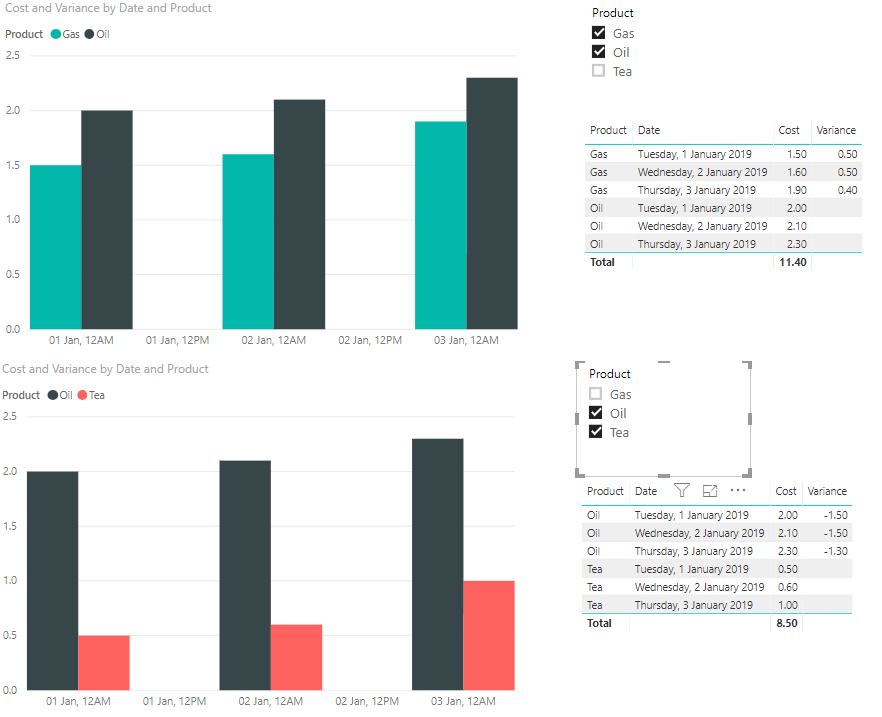
So the first part of your requirement you could just do with a single slicer on Product that is set to allow multiple selections.


2019-05 variance.png


Calculating the variance of a multi-select is a bit more involved, but not impossible (see the table on the right above). I did this with the following code:


Variance = 
var _selectedProducts = ALLSELECTED(Table1[Product])
var _countSelected = COUNTROWS(_selectedProducts)
var _prod1 = MINX(_selectedProducts,[Product])
var _prod2 = MAXX(_selectedProducts,[Product])
var _prod1Cost = CALCULATE(sum(Table1[Cost]), Table1[Product] = _prod1)
var _prod2Cost = CALCULATE(sum(Table1[Cost]), Table1[Product] = _prod2)
var _result = IF(_countSelected = 2 && SELECTEDVALUE(Table1[Product]) = _prod1, _prod2Cost - _prod1Cost)
RETURN _result

View solution in original post

2 REPLIES 2
d_gosbell
Super User
Super User

So the first part of your requirement you could just do with a single slicer on Product that is set to allow multiple selections.


2019-05 variance.png


Calculating the variance of a multi-select is a bit more involved, but not impossible (see the table on the right above). I did this with the following code:


Variance = 
var _selectedProducts = ALLSELECTED(Table1[Product])
var _countSelected = COUNTROWS(_selectedProducts)
var _prod1 = MINX(_selectedProducts,[Product])
var _prod2 = MAXX(_selectedProducts,[Product])
var _prod1Cost = CALCULATE(sum(Table1[Cost]), Table1[Product] = _prod1)
var _prod2Cost = CALCULATE(sum(Table1[Cost]), Table1[Product] = _prod2)
var _result = IF(_countSelected = 2 && SELECTEDVALUE(Table1[Product]) = _prod1, _prod2Cost - _prod1Cost)
RETURN _result

@d_gosbell  Thanks for the solution. This worked for me. The requirement was to have two slicers - From Product and To Product. So I created two Distinct(product) tables and then created slicers using those table. I had to then tweat your variance code a little. 


Thank You.


Helpful resources

Announcements
November Power BI Update Carousel

Power BI Monthly Update - November 2025

Check out the November 2025 Power BI update to learn about new features.

Fabric Data Days Carousel

Fabric Data Days

Advance your Data & AI career with 50 days of live learning, contests, hands-on challenges, study groups & certifications and more!

FabCon Atlanta 2026 carousel

FabCon Atlanta 2026

Join us at FabCon Atlanta, March 16-20, for the ultimate Fabric, Power BI, AI and SQL community-led event. Save $200 with code FABCOMM.