We've captured the moments from FabCon & SQLCon that everyone is talking about, and we are bringing them to the community, live and on-demand. Starts on April 14th. Register now
I have a table with the following columns:
Product, Date, Cost
I want to be able to have two slicers showing product. User can select a product from each slicer and I need to compare the cost of the two products by date.
Example:
Oil 1/1/2019 2.00
Gas 1/1/2019 1.50
Tea 1/1/2019 0.50
Oil 2/1/2019 2.10
Gas 2/1/2019 1.60
Tea 2/1/2019 0.60
Oil 3/1/2019 2.30
Gas 3/1/2019 1.90
Tea 3/1/2019 1.00
I want two slicers both showing Oil, Gas and Tea.
If user selects say Oil from one and Gas from the other, then output Graph should show
Dates as the X Coordinate, Price as the Y coordinate and bars for Oil and Gas for each date. I would also like to be able to calculate the variance between Oil price and Gas price for each date.
Solved! Go to Solution.
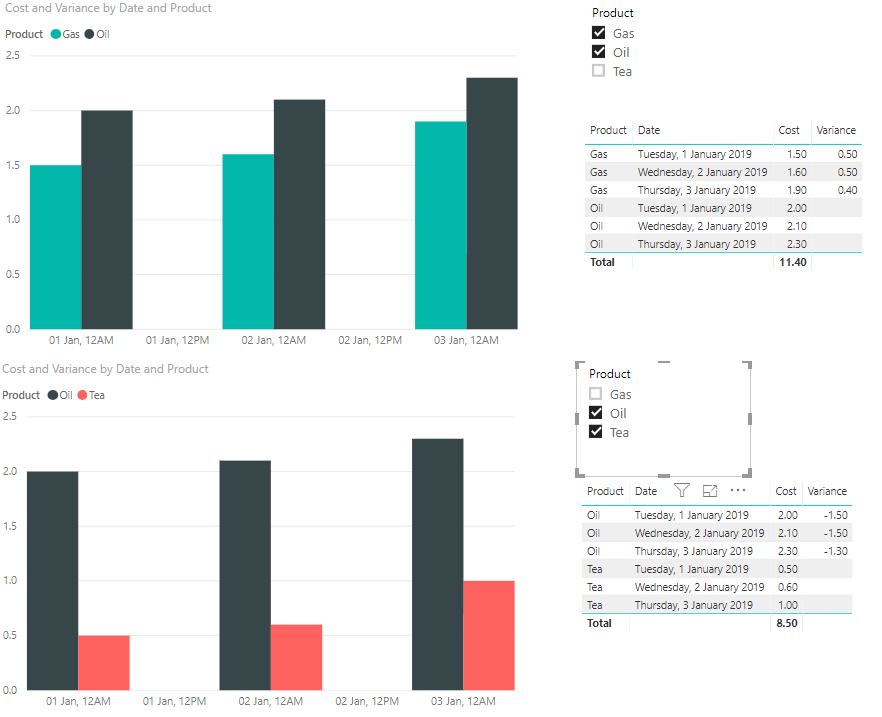
So the first part of your requirement you could just do with a single slicer on Product that is set to allow multiple selections.
Calculating the variance of a multi-select is a bit more involved, but not impossible (see the table on the right above). I did this with the following code:
Variance = var _selectedProducts = ALLSELECTED(Table1[Product]) var _countSelected = COUNTROWS(_selectedProducts) var _prod1 = MINX(_selectedProducts,[Product]) var _prod2 = MAXX(_selectedProducts,[Product]) var _prod1Cost = CALCULATE(sum(Table1[Cost]), Table1[Product] = _prod1) var _prod2Cost = CALCULATE(sum(Table1[Cost]), Table1[Product] = _prod2) var _result = IF(_countSelected = 2 && SELECTEDVALUE(Table1[Product]) = _prod1, _prod2Cost - _prod1Cost) RETURN _result
So the first part of your requirement you could just do with a single slicer on Product that is set to allow multiple selections.
Calculating the variance of a multi-select is a bit more involved, but not impossible (see the table on the right above). I did this with the following code:
Variance = var _selectedProducts = ALLSELECTED(Table1[Product]) var _countSelected = COUNTROWS(_selectedProducts) var _prod1 = MINX(_selectedProducts,[Product]) var _prod2 = MAXX(_selectedProducts,[Product]) var _prod1Cost = CALCULATE(sum(Table1[Cost]), Table1[Product] = _prod1) var _prod2Cost = CALCULATE(sum(Table1[Cost]), Table1[Product] = _prod2) var _result = IF(_countSelected = 2 && SELECTEDVALUE(Table1[Product]) = _prod1, _prod2Cost - _prod1Cost) RETURN _result
@d_gosbell Thanks for the solution. This worked for me. The requirement was to have two slicers - From Product and To Product. So I created two Distinct(product) tables and then created slicers using those table. I had to then tweat your variance code a little.
Thank You.
If you have recently started exploring Fabric, we'd love to hear how it's going. Your feedback can help with product improvements.
A new Power BI DataViz World Championship is coming this June! Don't miss out on submitting your entry.
Share feedback directly with Fabric product managers, participate in targeted research studies and influence the Fabric roadmap.
| User | Count |
|---|---|
| 2 | |
| 2 | |
| 1 | |
| 1 | |
| 1 |
| User | Count |
|---|---|
| 2 | |
| 2 | |
| 2 | |
| 2 | |
| 2 |