cancel
Showing results for 
Search instead for 
Did you mean: 

We've captured the moments from FabCon & SQLCon that everyone is talking about, and we are bringing them to the community, live and on-demand. Starts on April 14th. Register now

Reply
M_nwadibia
Resolver III
Resolver III

Chart display problem

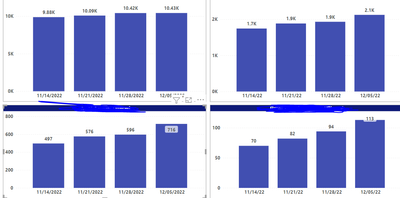
The data sets used in both charts are the same. The Power BI report on top displays correctly but below is the same report on Report builder which does not display correctly. The lower two charts on report builder displays the same data for the previous weeks. I need to use report builder for sending the reports

How can I solve this problem on the report builder


M_nwadibia_5-1670335156617.png


M_nwadibia_4-1670335080756.png


1 ACCEPTED SOLUTION

I have resolved this. The problem was that the last 3 charts were coming from the same dataset. I created a dataset for each chart and the display was fine

View solution in original post

5 REPLIES 5
sevenhills
Super User
Super User


Try this and see if that works:

Select chart > values > column > properties.

Labels: (check these properties and set)

     Label: Position: Top, Visible: True, UseValueAsLabel: True

     SmartLabels: Disabled: True;


See if it works.


Sample: RowsCount are the vaules used in the chart and see these properties and compare and set, see if this helps. (red color lined ones)


sevenhills_0-1670366806589.png


https://learn.microsoft.com/en-us/sql/reporting-services/report-design/position-labels-in-a-chart-re...

This didnt work. The probem is that each bar is displaying the same value which is the most current data. I need to see the cumulative data on each bar just like the upper two charts.

Ooops, what I gave is the position of data label details ... 


Your issue is same data for all series.  which is different than my steps.


Assuming the fields are from the same dataset, check the aggregate you are doing.


sevenhills_0-1670374410638.png


I have resolved this. The problem was that the last 3 charts were coming from the same dataset. I created a dataset for each chart and the display was fine

Glad it worked.

Helpful resources

Announcements
New to Fabric survey Carousel

New to Fabric Survey

If you have recently started exploring Fabric, we'd love to hear how it's going. Your feedback can help with product improvements.

Power BI DataViz World Championships carousel

Power BI DataViz World Championships - June 2026

A new Power BI DataViz World Championship is coming this June! Don't miss out on submitting your entry.

Join our Fabric User Panel

Join our Fabric User Panel

Share feedback directly with Fabric product managers, participate in targeted research studies and influence the Fabric roadmap.

March Power BI Update Carousel

Power BI Community Update - March 2026

Check out the March 2026 Power BI update to learn about new features.