cancel
Showing results for 
Search instead for 
Did you mean: 

July 7 - July 17 | Round 2 of the Power BI Dataviz World Championships. Don't miss your chance! Learn more

Reply
M_nwadibia
Resolver III
Resolver III

Chart display problem

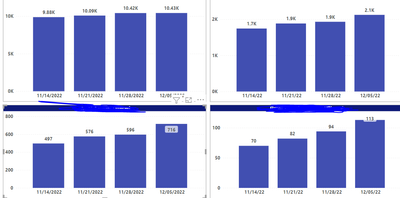
The data sets used in both charts are the same. The Power BI report on top displays correctly but below is the same report on Report builder which does not display correctly. The lower two charts on report builder displays the same data for the previous weeks. I need to use report builder for sending the reports

How can I solve this problem on the report builder


M_nwadibia_5-1670335156617.png


M_nwadibia_4-1670335080756.png


1 ACCEPTED SOLUTION

I have resolved this. The problem was that the last 3 charts were coming from the same dataset. I created a dataset for each chart and the display was fine

View solution in original post

5 REPLIES 5
sevenhills
Super User
Super User


Try this and see if that works:

Select chart > values > column > properties.

Labels: (check these properties and set)

     Label: Position: Top, Visible: True, UseValueAsLabel: True

     SmartLabels: Disabled: True;


See if it works.


Sample: RowsCount are the vaules used in the chart and see these properties and compare and set, see if this helps. (red color lined ones)


sevenhills_0-1670366806589.png


https://learn.microsoft.com/en-us/sql/reporting-services/report-design/position-labels-in-a-chart-re...

This didnt work. The probem is that each bar is displaying the same value which is the most current data. I need to see the cumulative data on each bar just like the upper two charts.

Ooops, what I gave is the position of data label details ... 


Your issue is same data for all series.  which is different than my steps.


Assuming the fields are from the same dataset, check the aggregate you are doing.


sevenhills_0-1670374410638.png


I have resolved this. The problem was that the last 3 charts were coming from the same dataset. I created a dataset for each chart and the display was fine

Glad it worked.

Helpful resources

Announcements
FabCon and SQLCon Barcelona 2026

FabCon & SQLCon – Barcelona 2026

Join us in Barcelona for FabCon and SQLCon, the Fabric, Power BI, SQL, and AI community event. Save €200 with code FABCMTY200.

60 days of Data Days Carousel

Data Days 2026

Join Fabric Data Days 2026: 60 days of free live/on-demand sessions, challenges, study groups, and certification opportunities.

Power BI DataViz World Championships carousel

Power BI DataViz World Championships - June 2026

A new Power BI DataViz World Championship is coming this June! Don't miss out on submitting your entry.