cancel
Showing results for 
Search instead for 
Did you mean: 

Learn from the best! Meet the four finalists headed to the FINALS of the Power BI Dataviz World Championships! Register now

Reply
Hijbul_Bari
Frequent Visitor

BI Server Data Source Windows Authentication Problem with Share Excel File

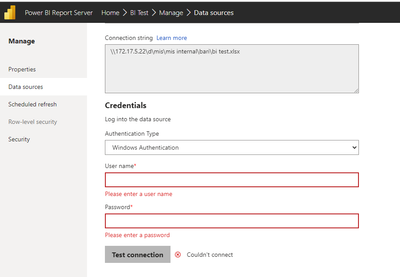
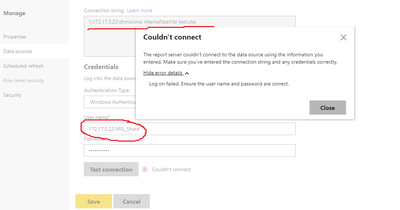
I have setup Power BI server on 172.17.5.15 (PC1) and Keep an Excel file on another (PC2) whose address is 172.17.5.22. I uploaded the test pbix file to the Power BI server, which worked fine. But when I tried to connect to the data source it's asking for windows authentication. I tried to give PC2 user name and password but it's not working. Please help me with what windows user id I will provide or how I write the user ID. Example: My user ID MIS_Share. 


Hijbul_Bari_1-1677157411385.pngHijbul_Bari_2-1677157479976.png


3 REPLIES 3
SamsonGlobal
Frequent Visitor

首先測試 你在Report Server這台電腦 能否透過資料夾輸入IP訪問\\172.17.5.22

如果可以訪問 理論上是可以使用的

ddt5363
New Member

I have a similar issue with connecting an Excel file (using WEB).  


Derick_Kor
New Member

I am facing similar issue, is the issue fixed?

Helpful resources

Announcements
Join our Fabric User Panel

Join our Fabric User Panel

Share feedback directly with Fabric product managers, participate in targeted research studies and influence the Fabric roadmap.

March Power BI Update Carousel

Power BI Community Update - March 2026

Check out the March 2026 Power BI update to learn about new features.