Don't miss your chance to take the Fabric Data Engineer (DP-600) exam for FREE! Find out how by attending the DP-600 session on April 23rd (pacific time), live or on-demand.
Learn moreNext up in the FabCon + SQLCon recap series: The roadmap for Microsoft SQL and Maximizing Developer experiences in Fabric. All sessions are available on-demand after the live show. Register now
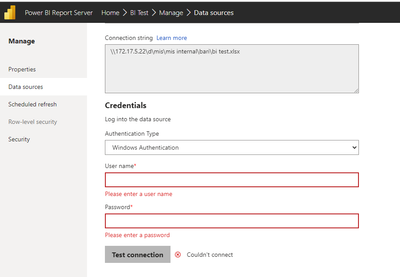
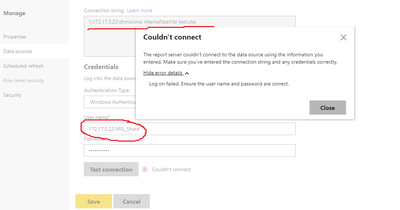
I have setup Power BI server on 172.17.5.15 (PC1) and Keep an Excel file on another (PC2) whose address is 172.17.5.22. I uploaded the test pbix file to the Power BI server, which worked fine. But when I tried to connect to the data source it's asking for windows authentication. I tried to give PC2 user name and password but it's not working. Please help me with what windows user id I will provide or how I write the user ID. Example: My user ID MIS_Share.
首先測試 你在Report Server這台電腦 能否透過資料夾輸入IP訪問\\172.17.5.22
如果可以訪問 理論上是可以使用的
I have a similar issue with connecting an Excel file (using WEB).
I am facing similar issue, is the issue fixed?
If you have recently started exploring Fabric, we'd love to hear how it's going. Your feedback can help with product improvements.
A new Power BI DataViz World Championship is coming this June! Don't miss out on submitting your entry.
Share feedback directly with Fabric product managers, participate in targeted research studies and influence the Fabric roadmap.
| User | Count |
|---|---|
| 3 | |
| 2 | |
| 2 | |
| 1 | |
| 1 |
| User | Count |
|---|---|
| 5 | |
| 3 | |
| 3 | |
| 3 | |
| 2 |