Get Fabric or SQL Certified for Free.
Get certified for free when you join Fabric Data Days 2026 and dive into Fabric, Power BI, SQL, AI, and other essential data skills.
Join now- Power BI forums
- Get Help with Power BI
- Desktop
- Service
- Report Server
- Power Query
- Mobile Apps
- Developer
- DAX Commands and Tips
- Custom Visuals Development Discussion
- Health and Life Sciences
- Power BI Spanish forums
- Translated Spanish Desktop
- Training and Consulting
- Instructor Led Training
- Dashboard in a Day for Women, by Women
- Galleries
- Data Stories Gallery
- Themes Gallery
- Contests Gallery
- QuickViz Gallery
- Quick Measures Gallery
- Visual Calculations Gallery
- Fabric Apps Gallery
- Notebook Gallery
- Translytical Task Flow Gallery
- TMDL Gallery
- R Script Showcase
- Webinars and Video Gallery
- Ideas
- Custom Visuals Ideas (read-only)
- Issues
- Issues
- Events
- Upcoming Events
July 28 - August 9 | Final Round of the Power BI Dataviz World Championships. This is your chance. Learn more
- Power BI forums
- Galleries
- R Script Showcase
- Power BI demo - Creating Effective Graphs with Mic...
Your file has been submitted successfully. We’re processing it now - please check back in a few minutes to view your report.
Power BI demo - Creating Effective Graphs with Microsoft R Open
09-26-2016 10:08 AM - last edited 09-30-2016 16:12 PM



- Mark as New
- Bookmark
- Subscribe
- Mute
- Subscribe to RSS Feed
- Permalink
- Report Inappropriate Content
Power BI demo - Creating Effective Graphs with Microsoft R Open


- Mark as New
- Bookmark
- Subscribe
- Mute
- Subscribe to RSS Feed
- Permalink
- Report Inappropriate Content
Hi Mike,
I've a question that is more related to Integration Architecture between PowerBI and HDInsight. Let's assume that my data is stored in Azure Storage Account or Data Lake STorage, and I have also HDInsight cluster running Microsoft R Server. In PowerBI, I need the R visual script to work on a massive amount of data stored in Data Lake Storage and run using Microsoft R Server, then it returns a relatively managebale dataset to be visualised.
Is this architecture attainable?
Thanks.
Is


- Mark as New
- Bookmark
- Subscribe
- Mute
- Subscribe to RSS Feed
- Permalink
- Report Inappropriate Content
This is an amazing work. If you consider to convert some of your R-visuals to R-powered-custom visuals, out team will be happy to assist you. Almost all of these visuals are great candidates for the PBI Gallery ! I tested the support for R-packages in service, all of the packages beside "micromapST" are already supported.
The visibility of R-powered custom visuals in gallery is greater and it is not limited for R-users.

- Mark as New
- Bookmark
- Subscribe
- Mute
- Subscribe to RSS Feed
- Permalink
- Report Inappropriate Content
Thanks,
it's a great help for me to learn how to use R with Power BI.
Great work.
- Mark as New
- Bookmark
- Subscribe
- Mute
- Subscribe to RSS Feed
- Permalink
- Report Inappropriate Content
Prerequisites (The sample .pbix files will not work without these prerequites completed)
1. Install R Engine
Power BI Desktop does not include, deploy or install the R engine. To run R scripts in Power BI Desktop, you must separately installR on your local computer. You can download and install R for free from many locations, including the Revolution Open download page, and the CRAN Repository.
2. Install the required R packages.
Download the R script attached to this message and run it to install all required packages on your local machine.
Required R packages:
stats, lattice, MASS, ggplot2, tidyr, HH, dplyr, micromapST
Tested on:
CRAN 3.3.1, MRO 3.3.1, Power BI Desktop 2.38 (August 2016)
Legal Disclaimers:
Terms of Service and Third Party Programs.
- Mark as New
- Bookmark
- Subscribe
- Mute
- Subscribe to RSS Feed
- Permalink
- Report Inappropriate Content
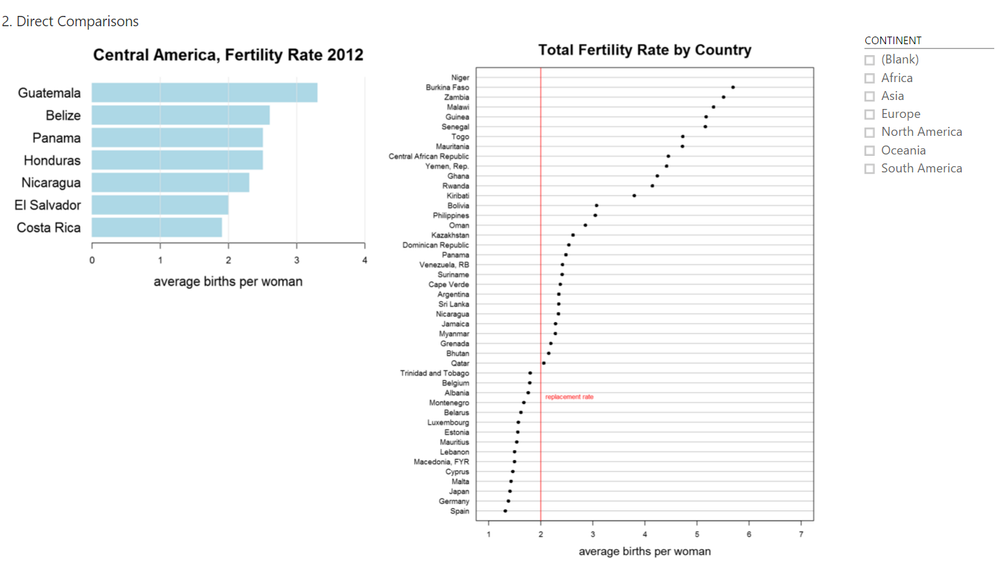
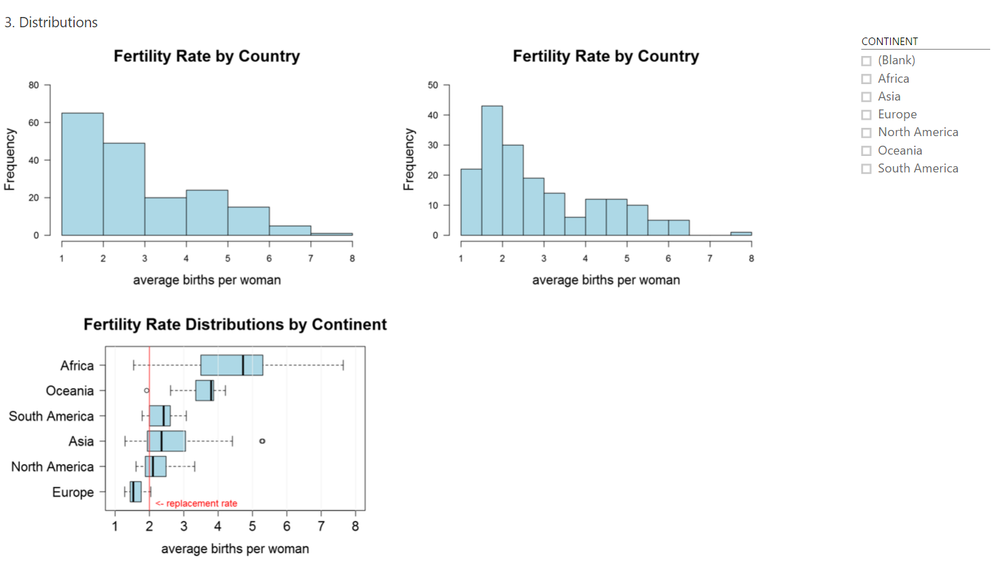
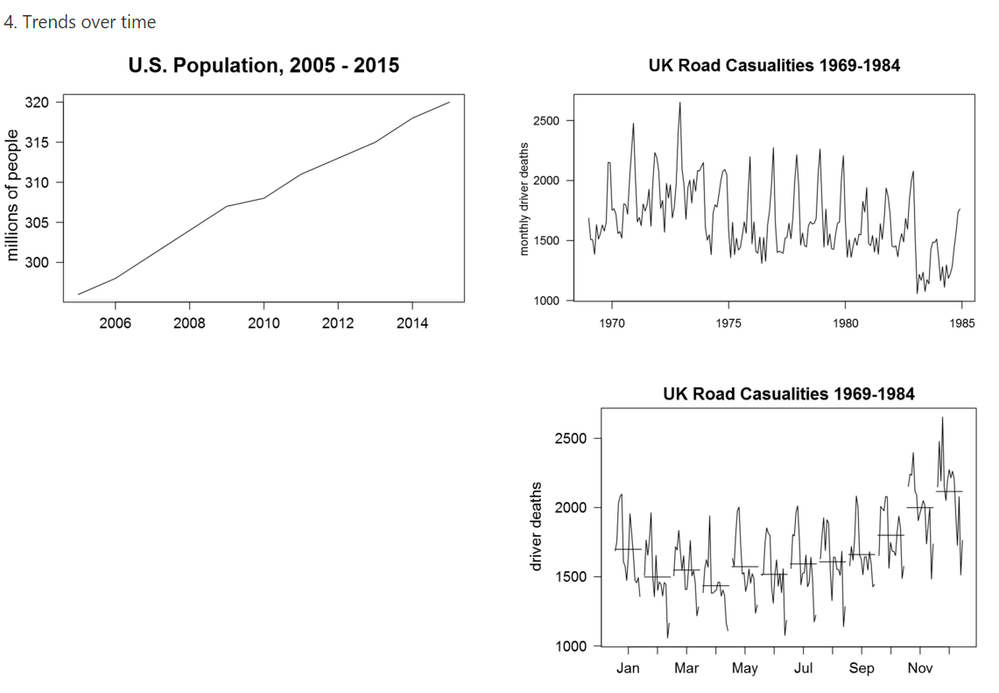
Screen shots of my pages for:
2. Direct Comparisons
3. Distributions
4. Trends over time
- Mark as New
- Bookmark
- Subscribe
- Mute
- Subscribe to RSS Feed
- Permalink
- Report Inappropriate Content
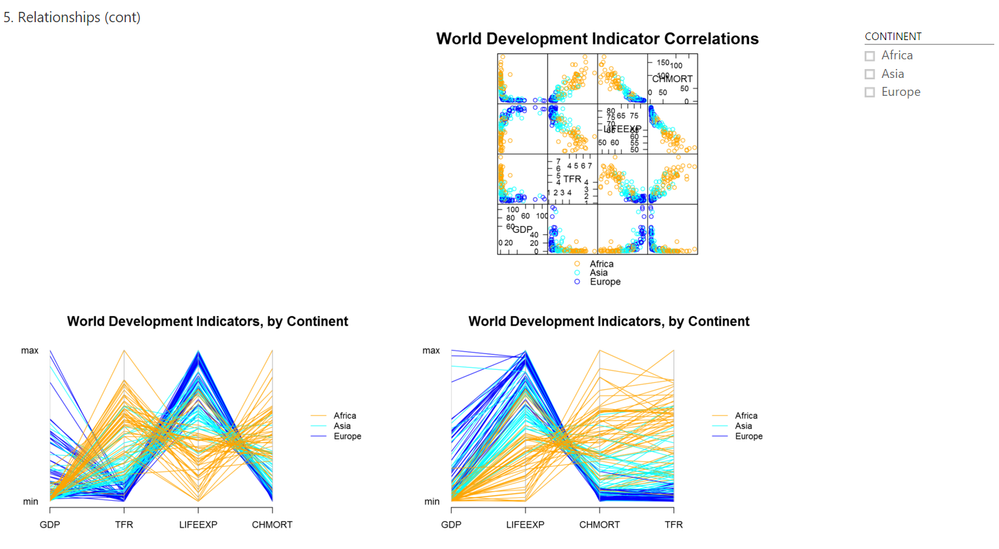
Screen shots of my pages for:
5. Relationships
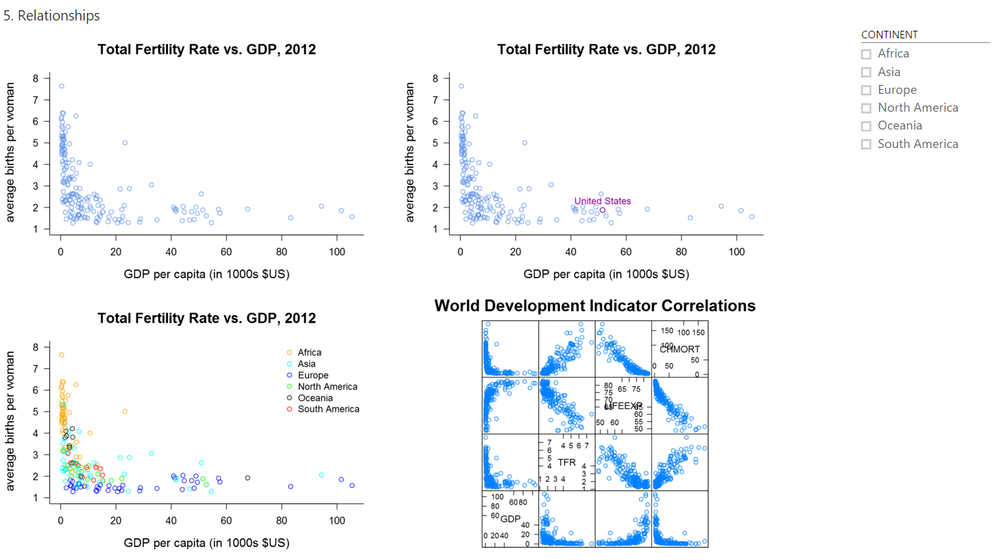
6. Percents

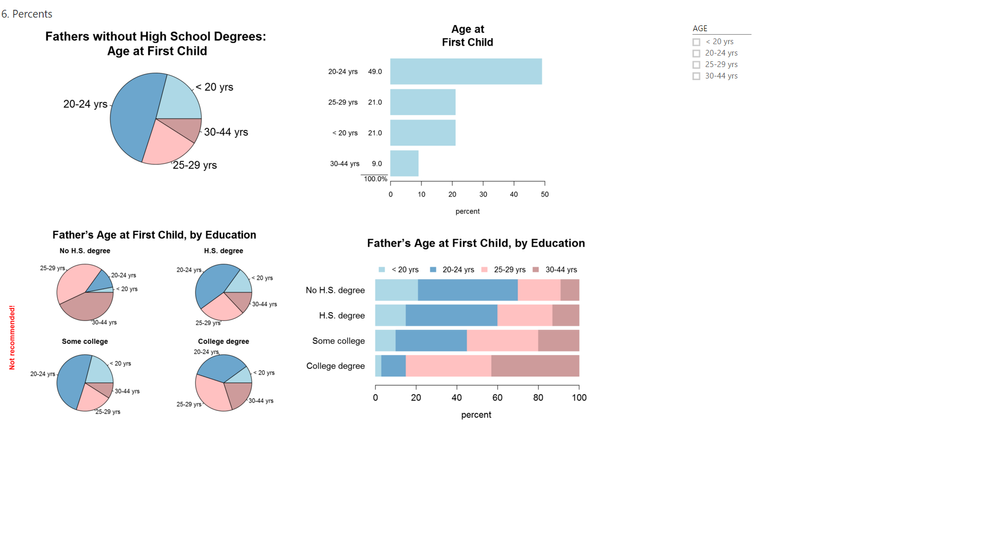
7. Special Cases


