Join us at FabCon Atlanta from March 16 - 20, 2026, for the ultimate Fabric, Power BI, AI and SQL community-led event. Save $200 with code FABCOMM.
Register now!The Power BI Data Visualization World Championships is back! Get ahead of the game and start preparing now! Learn more
Hi,
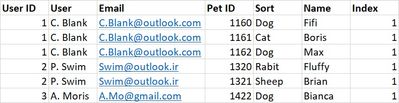
I made a dashboard that measures several metrics of a certain animal-related company. A problem is that the data comes in quite messy so to get my filters to work I have to register all data into a combined Query. Not really a problem normally but since I want to count both the number of users and the number of pets it is one now. The thing is, one user ID has several pet ID's linked to it, which in turn gives double values. Normally you would delete those but if I do that it deletes all pets but one. So at the moment, It looks like this for example:
through the index, it can only count the number of pets but not the user.
So I am kinda looking for a function similar to: IF [user_id] IS 'DUBBLE.VALUE' THEN [index] IS 'ZERO' so it will only count the users one time while still counting all the pets.
I've been looking for days but cannot find the answer anywhere online or offline so maybe somebody has a solution here?
Solved! Go to Solution.
You can try this in blank query.
let
Source = Table.FromRows(Json.Document(Binary.Decompress(Binary.FromText("i45WMlTSUXLWc8pJzMsGspL1kkAsh/zSkpz8/Gy95PxcoKihoZkBkHLJTweSbplpICGlWB2iNYOVJZYASaf8osxiUrUbwe32TayAawaJBugFl2eCVBUDKXSNxkYgRwclJmWCbHbLKU0jRS/IbcEZqakFIFcXVcK1GgNZjnq+UH8k6uXmO6TnJmbmwHSaGCGc61iUCNEXCwA=", BinaryEncoding.Base64), Compression.Deflate)), let _t = ((type nullable text) meta [Serialized.Text = true]) in type table [#"User ID" = _t, User = _t, Email = _t, Pet = _t, Sort = _t, Name = _t, Index = _t]),
#"Grouped Rows" = Table.Group(Source, {"User ID"}, {{"Gr", each Table.AddColumn(Table.AddIndexColumn(_,"Help", 0,1), "Index2", each if [Help]=0 then 1 else 0)}}),
#"Expanded Gr" = Table.ExpandTableColumn(#"Grouped Rows", "Gr", {"User", "Email", "Pet", "Sort", "Name", "Index", "Index2"}, {"User", "Email", "Pet", "Sort", "Name", "Index", "Index2"})
in
#"Expanded Gr"
Hi @Anonymous
@Jakinta 's solution looks great. Does it solve your problem? If it's not what you want, could you show what should be the expected result in Index column (or a new column)?
Regards,
Community Support Team _ Jing
You can try this in blank query.
let
Source = Table.FromRows(Json.Document(Binary.Decompress(Binary.FromText("i45WMlTSUXLWc8pJzMsGspL1kkAsh/zSkpz8/Gy95PxcoKihoZkBkHLJTweSbplpICGlWB2iNYOVJZYASaf8osxiUrUbwe32TayAawaJBugFl2eCVBUDKXSNxkYgRwclJmWCbHbLKU0jRS/IbcEZqakFIFcXVcK1GgNZjnq+UH8k6uXmO6TnJmbmwHSaGCGc61iUCNEXCwA=", BinaryEncoding.Base64), Compression.Deflate)), let _t = ((type nullable text) meta [Serialized.Text = true]) in type table [#"User ID" = _t, User = _t, Email = _t, Pet = _t, Sort = _t, Name = _t, Index = _t]),
#"Grouped Rows" = Table.Group(Source, {"User ID"}, {{"Gr", each Table.AddColumn(Table.AddIndexColumn(_,"Help", 0,1), "Index2", each if [Help]=0 then 1 else 0)}}),
#"Expanded Gr" = Table.ExpandTableColumn(#"Grouped Rows", "Gr", {"User", "Email", "Pet", "Sort", "Name", "Index", "Index2"}, {"User", "Email", "Pet", "Sort", "Name", "Index", "Index2"})
in
#"Expanded Gr"
The Power BI Data Visualization World Championships is back! Get ahead of the game and start preparing now!