Join us at FabCon Atlanta from March 16 - 20, 2026, for the ultimate Fabric, Power BI, AI and SQL community-led event. Save $200 with code FABCOMM.
Register now!Get Fabric Certified for FREE during Fabric Data Days. Don't miss your chance! Request now
Hello !
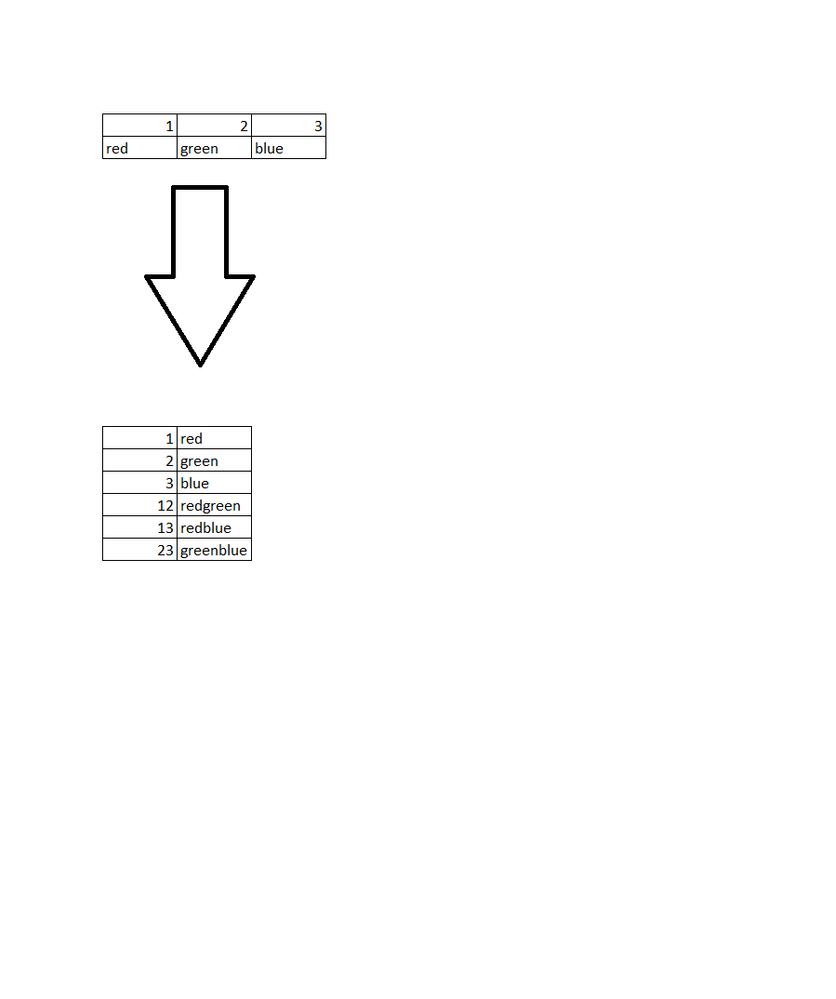
Does anybody have any idea how to twist the dataset like below?
The number of columns in the input is dynamic.
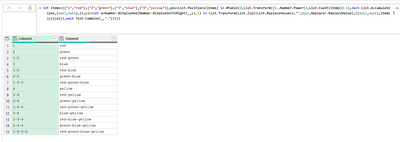
= let items={{"1","red"},{"2","green"},{"3","blue"},{"4","yellow"}},pos=List.Positions(items) in #table(2,List.Transform({1..Number.Power(2,List.Count(items))-1},each List.Accumulate(pos,{null,null},(x,y)=>let a=Number.BitwiseAnd(Number.BitwiseShiftRight(_,y),1) in List.Transform(List.Zip({List.ReplaceValue(x,"",null,Replacer.ReplaceValue),{{null,null},items{y}}{a}}),each Text.Combine(_,"-")))))
Check out the November 2025 Power BI update to learn about new features.
Advance your Data & AI career with 50 days of live learning, contests, hands-on challenges, study groups & certifications and more!
| User | Count |
|---|---|
| 11 | |
| 10 | |
| 6 | |
| 5 | |
| 4 |
| User | Count |
|---|---|
| 26 | |
| 17 | |
| 13 | |
| 13 | |
| 9 |