cancel
Showing results for 
Search instead for 
Did you mean: 

The Power BI Data Visualization World Championships is back! Get ahead of the game and start preparing now! Learn more

Reply
hashtag_pete
Helper V
Helper V

transform rows to columns

Hello folks, 

I have a table from Business Central which I need to transform from this:

Dimension Set IDDimension_CodeDimension Value Code
10OperationDE052-01
10Service5201
17BA120
17OperationDE053-01
17Service5301

to this:

Dimension Set IDDimension_Code1Dimension_Code2Dimension_Code3Dimension Value Code1Dimension Value Code2Dimension Value Code3
10OperationServicenullDE052-015201null
17BAOperationService120DE053-015301

Can anyone help on this?


Reason is, that I have in BC my fixed assets table, where only the Dimension Set ID is given, but I want to have the other information in this row as well. When I do the join of those two tables, Power Query will double or triple each line for the information of the dimension set. 

Thanks

hashtag_pete

1 ACCEPTED SOLUTION
Vera_33
Resident Rockstar
Resident Rockstar

Hi @hashtag_pete 


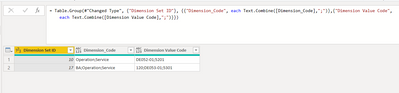
Here is one way, combine the values then split

Vera_33_0-1641374885369.png

let
    Source = Table.FromRows(Json.Document(Binary.Decompress(Binary.FromText("i45WMjRQ0lHyL0gtSizJzM8Dsl1cDUyNdA0MlWJ1oLLBqUVlmcmpQJapEUzcHMhzcgQShkYGCBF0c4x1kdUjmWMMEo8FAA==", BinaryEncoding.Base64), Compression.Deflate)), let _t = ((type nullable text) meta [Serialized.Text = true]) in type table [#"Dimension Set ID" = _t, Dimension_Code = _t, #"Dimension Value Code" = _t]),
    #"Changed Type" = Table.TransformColumnTypes(Source,{{"Dimension Set ID", Int64.Type}, {"Dimension_Code", type text}, {"Dimension Value Code", type text}}),
    #"Grouped Rows" = Table.Group(#"Changed Type", {"Dimension Set ID"}, {{"Dimension_Code", each Text.Combine([Dimension_Code],";")},{"Dimension Value Code",each Text.Combine([Dimension Value Code],";")}}),
    #"Split Column by Delimiter" = Table.SplitColumn(#"Grouped Rows", "Dimension_Code", Splitter.SplitTextByDelimiter(";", QuoteStyle.Csv)),
    #"Split Column by Delimiter1" = Table.SplitColumn(#"Split Column by Delimiter", "Dimension Value Code", Splitter.SplitTextByDelimiter(";", QuoteStyle.Csv))
in
    #"Split Column by Delimiter1"


View solution in original post

2 REPLIES 2
hashtag_pete
Helper V
Helper V

Thank you, @Vera_33 , that's brilliant!

Vera_33
Resident Rockstar
Resident Rockstar

Hi @hashtag_pete 


Here is one way, combine the values then split

Vera_33_0-1641374885369.png

let
    Source = Table.FromRows(Json.Document(Binary.Decompress(Binary.FromText("i45WMjRQ0lHyL0gtSizJzM8Dsl1cDUyNdA0MlWJ1oLLBqUVlmcmpQJapEUzcHMhzcgQShkYGCBF0c4x1kdUjmWMMEo8FAA==", BinaryEncoding.Base64), Compression.Deflate)), let _t = ((type nullable text) meta [Serialized.Text = true]) in type table [#"Dimension Set ID" = _t, Dimension_Code = _t, #"Dimension Value Code" = _t]),
    #"Changed Type" = Table.TransformColumnTypes(Source,{{"Dimension Set ID", Int64.Type}, {"Dimension_Code", type text}, {"Dimension Value Code", type text}}),
    #"Grouped Rows" = Table.Group(#"Changed Type", {"Dimension Set ID"}, {{"Dimension_Code", each Text.Combine([Dimension_Code],";")},{"Dimension Value Code",each Text.Combine([Dimension Value Code],";")}}),
    #"Split Column by Delimiter" = Table.SplitColumn(#"Grouped Rows", "Dimension_Code", Splitter.SplitTextByDelimiter(";", QuoteStyle.Csv)),
    #"Split Column by Delimiter1" = Table.SplitColumn(#"Split Column by Delimiter", "Dimension Value Code", Splitter.SplitTextByDelimiter(";", QuoteStyle.Csv))
in
    #"Split Column by Delimiter1"


Helpful resources

Announcements
November Power BI Update Carousel

Power BI Monthly Update - November 2025

Check out the November 2025 Power BI update to learn about new features.

Fabric Data Days Carousel

Fabric Data Days

Advance your Data & AI career with 50 days of live learning, contests, hands-on challenges, study groups & certifications and more!

FabCon Atlanta 2026 carousel

FabCon Atlanta 2026

Join us at FabCon Atlanta, March 16-20, for the ultimate Fabric, Power BI, AI and SQL community-led event. Save $200 with code FABCOMM.