cancel
Showing results for 
Search instead for 
Did you mean: 

Learn from the best! Meet the four finalists headed to the FINALS of the Power BI Dataviz World Championships! Register now

Reply
hashtag_pete
Helper V
Helper V

transform rows to columns

Hello folks, 

I have a table from Business Central which I need to transform from this:

Dimension Set IDDimension_CodeDimension Value Code
10OperationDE052-01
10Service5201
17BA120
17OperationDE053-01
17Service5301

to this:

Dimension Set IDDimension_Code1Dimension_Code2Dimension_Code3Dimension Value Code1Dimension Value Code2Dimension Value Code3
10OperationServicenullDE052-015201null
17BAOperationService120DE053-015301

Can anyone help on this?


Reason is, that I have in BC my fixed assets table, where only the Dimension Set ID is given, but I want to have the other information in this row as well. When I do the join of those two tables, Power Query will double or triple each line for the information of the dimension set. 

Thanks

hashtag_pete

1 ACCEPTED SOLUTION
Anonymous
Not applicable

Hi @hashtag_pete 


Here is one way, combine the values then split
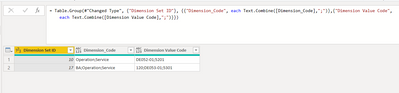
Vera_33_0-1641374885369.png

let
    Source = Table.FromRows(Json.Document(Binary.Decompress(Binary.FromText("i45WMjRQ0lHyL0gtSizJzM8Dsl1cDUyNdA0MlWJ1oLLBqUVlmcmpQJapEUzcHMhzcgQShkYGCBF0c4x1kdUjmWMMEo8FAA==", BinaryEncoding.Base64), Compression.Deflate)), let _t = ((type nullable text) meta [Serialized.Text = true]) in type table [#"Dimension Set ID" = _t, Dimension_Code = _t, #"Dimension Value Code" = _t]),
    #"Changed Type" = Table.TransformColumnTypes(Source,{{"Dimension Set ID", Int64.Type}, {"Dimension_Code", type text}, {"Dimension Value Code", type text}}),
    #"Grouped Rows" = Table.Group(#"Changed Type", {"Dimension Set ID"}, {{"Dimension_Code", each Text.Combine([Dimension_Code],";")},{"Dimension Value Code",each Text.Combine([Dimension Value Code],";")}}),
    #"Split Column by Delimiter" = Table.SplitColumn(#"Grouped Rows", "Dimension_Code", Splitter.SplitTextByDelimiter(";", QuoteStyle.Csv)),
    #"Split Column by Delimiter1" = Table.SplitColumn(#"Split Column by Delimiter", "Dimension Value Code", Splitter.SplitTextByDelimiter(";", QuoteStyle.Csv))
in
    #"Split Column by Delimiter1"


View solution in original post

2 REPLIES 2
hashtag_pete
Helper V
Helper V

Thank you, @Anonymous , that's brilliant!

Anonymous
Not applicable

Hi @hashtag_pete 


Here is one way, combine the values then split

Vera_33_0-1641374885369.png

let
    Source = Table.FromRows(Json.Document(Binary.Decompress(Binary.FromText("i45WMjRQ0lHyL0gtSizJzM8Dsl1cDUyNdA0MlWJ1oLLBqUVlmcmpQJapEUzcHMhzcgQShkYGCBF0c4x1kdUjmWMMEo8FAA==", BinaryEncoding.Base64), Compression.Deflate)), let _t = ((type nullable text) meta [Serialized.Text = true]) in type table [#"Dimension Set ID" = _t, Dimension_Code = _t, #"Dimension Value Code" = _t]),
    #"Changed Type" = Table.TransformColumnTypes(Source,{{"Dimension Set ID", Int64.Type}, {"Dimension_Code", type text}, {"Dimension Value Code", type text}}),
    #"Grouped Rows" = Table.Group(#"Changed Type", {"Dimension Set ID"}, {{"Dimension_Code", each Text.Combine([Dimension_Code],";")},{"Dimension Value Code",each Text.Combine([Dimension Value Code],";")}}),
    #"Split Column by Delimiter" = Table.SplitColumn(#"Grouped Rows", "Dimension_Code", Splitter.SplitTextByDelimiter(";", QuoteStyle.Csv)),
    #"Split Column by Delimiter1" = Table.SplitColumn(#"Split Column by Delimiter", "Dimension Value Code", Splitter.SplitTextByDelimiter(";", QuoteStyle.Csv))
in
    #"Split Column by Delimiter1"


Helpful resources

Announcements
Join our Fabric User Panel

Join our Fabric User Panel

Share feedback directly with Fabric product managers, participate in targeted research studies and influence the Fabric roadmap.

February Power BI Update Carousel

Power BI Monthly Update - February 2026

Check out the February 2026 Power BI update to learn about new features.

FabCon Atlanta 2026 carousel

FabCon Atlanta 2026

Join us at FabCon Atlanta, March 16-20, for the ultimate Fabric, Power BI, AI and SQL community-led event. Save $200 with code FABCOMM.

Top Solution Authors