cancel
Showing results for 
Search instead for 
Did you mean: 

Try your skills in the Power BI Dataviz World Championship! Round one ends June 26. Join now

Reply
Anonymous
Not applicable

several relations between two tables

hello


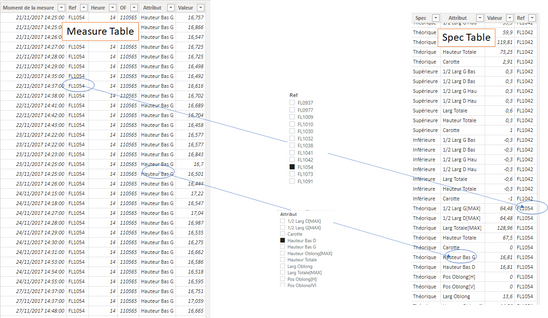
i have two tables, with same Attributs and name of Reference.

The first table is my measure table, and the second one is my specification table.

I want to filter my specification table thanks to my measure table, with two filter/segment : the Attributs and the Reference.

vadim_g_1-1638552853271.png

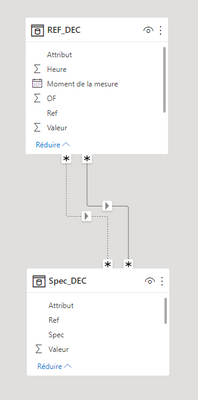
But it is forbidden :

vadim_g_2-1638552951274.png


How can i fix it ?


thanks a lot


1 ACCEPTED SOLUTION
AlexisOlson
Super User
Super User

A relationship can only be created between single columns, so if you need a relationship on multiple columns, then you need a combined column or index to match on. This isn't often a great idea though.


A better solution is to create a proper star schema with dimension table(s) for these columns.

View solution in original post

3 REPLIES 3
AlexisOlson
Super User
Super User

A relationship can only be created between single columns, so if you need a relationship on multiple columns, then you need a combined column or index to match on. This isn't often a great idea though.


A better solution is to create a proper star schema with dimension table(s) for these columns.

Anonymous
Not applicable

thank you !!

i find that create a new column with a combination of two name in each table, was for me the easier and faster solution. it works well, because i need so a single relationship on this "index false name filter".

i will examine the star schema when i will have time 😉


mahoneypat
Microsoft Employee
Microsoft Employee

Only one relationship can be active at a time, so you need to use USERELATIONSHIP to activate the inactive/dotted one in your measure(s).

Using USERELATIONSHIP in DAX - SQLBI

Pat


Did I answer your question? Mark my post as a solution! Kudos are also appreciated!

To learn more about Power BI, follow me on Twitter or subscribe on YouTube.


@mahoneypa HoosierBI on YouTube


Helpful resources

Announcements
Fabric Data Days is here Carousel

Data Days 2026

Don't miss out on Data Days, June 15 through August 7. Learn Fabric, Power BI, SQL, AI and more.

May Power BI Update Carousel

Power BI Monthly Update - May 2026

Check out the May 2026 Power BI update to learn about new features.

Power BI DataViz World Championships carousel

Power BI DataViz World Championships - June 2026

A new Power BI DataViz World Championship is coming this June! Don't miss out on submitting your entry.