Join us at FabCon Atlanta from March 16 - 20, 2026, for the ultimate Fabric, Power BI, AI and SQL community-led event. Save $200 with code FABCOMM.
Register now!Get Fabric certified for FREE! Don't miss your chance! Learn more
Hi,
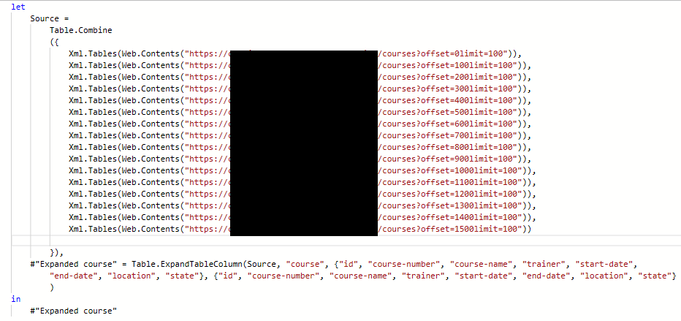
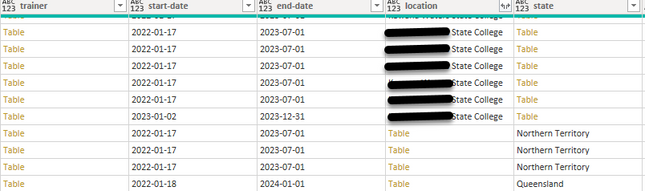
I have a query that has an API call to a table that returns an XML. Due to limitations on the API, I need to call the API for multiple pages. For some reason some of the columns are being returned as a single Text Value (or Date depending on the column) on one call but a Table Value on another.
Advanced Editor:
Sample output (this is also happening to a number of other columns):
Is there a way to stop having these incorrectly set as a table value?
A way to convent just those that have been incorectly set as a Table Value?
Any help is appreciated.
Thanks, Reece.
Hi @Anonymous ,
Sorry for that the information you have provided is not making the problem clear to me.
Do you want to keep on expanding Table values ? Or just filter out Table values?
Refer to:
Power Query XML connector - Power Query | Microsoft Docs:
Due to the fact that many XML documents have ragged or nested data, you may have to do extra data shaping to get it in the sort of form that will make it convenient to do analytics. This holds true whether you use the UI accessible Xml.Tables function, or the Xml.Document function. Depending on your needs, you may find you have to do more or less data shaping.
Best Regards,
Eyelyn Qin
Hi Eyelyn,
I am wanting the data in the "table" fields shown in the column just list the rest of the data in those columns.
Share feedback directly with Fabric product managers, participate in targeted research studies and influence the Fabric roadmap.
Check out the February 2026 Power BI update to learn about new features.
| User | Count |
|---|---|
| 12 | |
| 12 | |
| 10 | |
| 6 | |
| 5 |