This is best Fabric, Power BI, SQL and AI community event. How do we know? The last event sold out! Save €200 with code FABCMTY200.
Register nowThe Fabric community is upgrading! Read all of the details including the timeline and what you can expect. Learn more
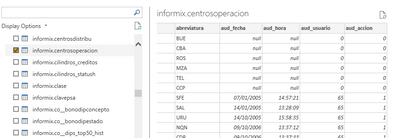
DataSource.Error: Microsoft Informix Client: Date could not be converted to month/day/year format SQLSTATE=IX000 SQLCODE=-1210 Detalles: DataSourceKind=Informix DataSourcePath=10.11.0.311:9089;pbase Message=Date could not be converted to month/day/year format SQLSTATE=IX000 SQLCODE=-1210 ErrorCode=0
I changed the regional settings to Englist(United Kingdom) and (United States) but the problem persit.
In both tables de column date have the format mm/dd/yyyy.
Solved! Go to Solution.
Hi @arolhaiser ,
Try to go into Power Query Editor.
1.Change the error field data type to text format.
2.Right click the Date2 column, select Using Locale.
3.The data type is changed to date format, and the local selection is the same as the text format.
4.After click OK, the results is as follows.
https://www.myonlinetraininghub.com/change-type-using-locale-with-power-query
Best Regards,
Stephen Tao
If this post helps, then please consider Accept it as the solution to help the other members find it more quickly.
Hi @arolhaiser ,
Try to go into Power Query Editor.
1.Change the error field data type to text format.
2.Right click the Date2 column, select Using Locale.
3.The data type is changed to date format, and the local selection is the same as the text format.
4.After click OK, the results is as follows.
https://www.myonlinetraininghub.com/change-type-using-locale-with-power-query
Best Regards,
Stephen Tao
If this post helps, then please consider Accept it as the solution to help the other members find it more quickly.
Join us in Barcelona for FabCon and SQLCon, the Fabric, Power BI, SQL, and AI community event. Save €200 with code FABCMTY200.