
cancel
Showing results for 
Search instead for 
Did you mean: 

The Power BI Data Visualization World Championships is back! Get ahead of the game and start preparing now! Learn more

Reply
reynaldo_malave
Helper III
Helper III

error with Table.Group

Hi guys, 


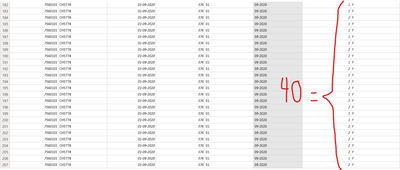
I have a table that i want to group by multiple features. The correct nswer should be forty but instead is giving 320. I leave the images below.


BeforeTable.Group

reynaldo_malave_0-1602775006109.png


After Table.Group


reynaldo_malave_1-1602775147317.png


Any help would be greatly appreciated


Rey

3 REPLIES 3
Anonymous
Not applicable

Try changing the List.Sum to List.Count. 

ziying35
Impactful Individual

Hi, @reynaldo_malave 

I don't get it, do you mean that the column you marked on the screenshot, automatically split into group when their values sum to 40 each time?

lbendlin
Super User
Super User

Please provide sample data in usable format.

Helpful resources

Announcements
Power BI DataViz World Championships

Power BI Dataviz World Championships

The Power BI Data Visualization World Championships is back! Get ahead of the game and start preparing now!

December 2025 Power BI Update Carousel

Power BI Monthly Update - December 2025

Check out the December 2025 Power BI Holiday Recap!

FabCon Atlanta 2026 carousel

FabCon Atlanta 2026

Join us at FabCon Atlanta, March 16-20, for the ultimate Fabric, Power BI, AI and SQL community-led event. Save $200 with code FABCOMM.

Top Solution Authors