
Get certified for free when you join Fabric Data Days 2026 and dive into Fabric, Power BI, SQL, AI, and other essential data skills.
Join nowData Days is here! Join us now for 60+ days of learning, challenges, and connection. Learn more
Hi guys,
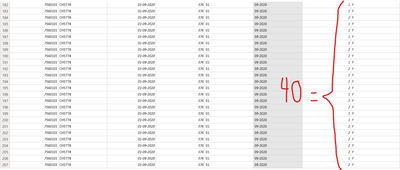
I have a table that i want to group by multiple features. The correct nswer should be forty but instead is giving 320. I leave the images below.
BeforeTable.Group
After Table.Group
Any help would be greatly appreciated
Rey
Try changing the List.Sum to List.Count.
Hi, @reynaldo_malave
I don't get it, do you mean that the column you marked on the screenshot, automatically split into group when their values sum to 40 each time?
Please provide sample data in usable format.
Don't miss out on Data Days, June 15 through August 7. Learn Fabric, Power BI, SQL, AI and more.
Check out the May 2026 Power BI update to learn about new features.
| User | Count |
|---|---|
| 4 | |
| 4 | |
| 2 | |
| 2 | |
| 1 |
| User | Count |
|---|---|
| 11 | |
| 11 | |
| 5 | |
| 4 | |
| 4 |