
cancel
Showing results for 
Search instead for 
Did you mean: 

July 7 - July 17 | Round 2 of the Power BI Dataviz World Championships. Don't miss your chance! Learn more

Reply
Anonymous
Not applicable

error when converting text to number

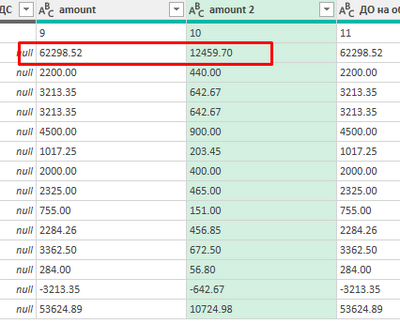
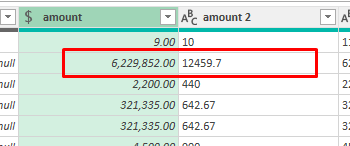
Community, I am trying to convert text to number (or currency). I am still very new to Power Query so i am sure this is somethign rpetty simple but i literally spent 5h trying to figure it out 😞 


please help


martchi_0-1645221572175.png

martchi_1-1645221656786.png


1 ACCEPTED SOLUTION
Anonymous
Not applicable

I would Select the columns Amount 1 and Amount 2, right click, and choose   Change Type, then Using Locale, and then select whichever locale, but United States or us-En (I can't remember the parameters but it's a dropdown). Then select "Currency" as the type.


Good Luck!


--Nate

View solution in original post

3 REPLIES 3
v-angzheng-msft
Community Support
Community Support

Hi, @Anonymous 

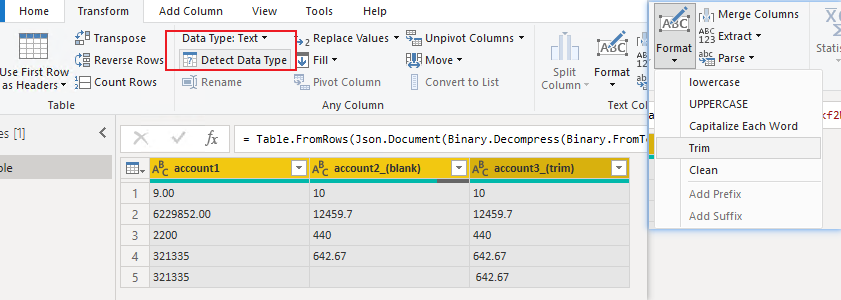
Select the target column, click the Data Type drop-down option in the UI to select the data type you want, or click Detect Data Type.
If you can't convert to numeric type successfully, there may be invisible non-printing characters in the column. You can click the format drop-down option in the UI, select Trim in the options, and then convert the data type.

vangzhengmsft_0-1645508988471.png

Tip: Data is left-aligned for text types, and right-aligned for numeric types.


If you need to format the data in the column as currency, select the column in PowerBI and click the format icon in the UI.

vangzhengmsft_1-1645509212854.png


Best Regards,
Community Support Team _ Zeon Zheng


If this post helps, then please consider Accept it as the solution to help the other members find it more quickly.

This worked out perfectly , Thanks

Anonymous
Not applicable

I would Select the columns Amount 1 and Amount 2, right click, and choose   Change Type, then Using Locale, and then select whichever locale, but United States or us-En (I can't remember the parameters but it's a dropdown). Then select "Currency" as the type.


Good Luck!


--Nate

Helpful resources

Announcements
FabCon and SQLCon Barcelona 2026

FabCon & SQLCon – Barcelona 2026

Join us in Barcelona for FabCon and SQLCon, the Fabric, Power BI, SQL, and AI community event. Save €200 with code FABCMTY200.

60 days of Data Days Carousel

Data Days 2026

Join Fabric Data Days 2026: 60 days of free live/on-demand sessions, challenges, study groups, and certification opportunities.

Power BI DataViz World Championships carousel

Power BI DataViz World Championships - June 2026

A new Power BI DataViz World Championship is coming this June! Don't miss out on submitting your entry.