This is best Fabric, Power BI, SQL and AI community event. How do we know? The last event sold out! Save €200 with code FABCMTY200.
Register nowA new Data Days event is coming soon! This time we’re going bigger than ever. Fabric, Power BI, SQL, AI and more. Don't miss out.
Hello,
I am trying to import more data from Adobe Analytics, but I have issue with loading data. I want to filter data and get only a few parameters to datasets. I tried to find lots solutions here, but does not works.
I tried to filter marketing channel display
..
{Cube.ApplyParameter, "Display", {#(Marketing Channel)}},
..
Should i use advanced editor only?
Thank you..
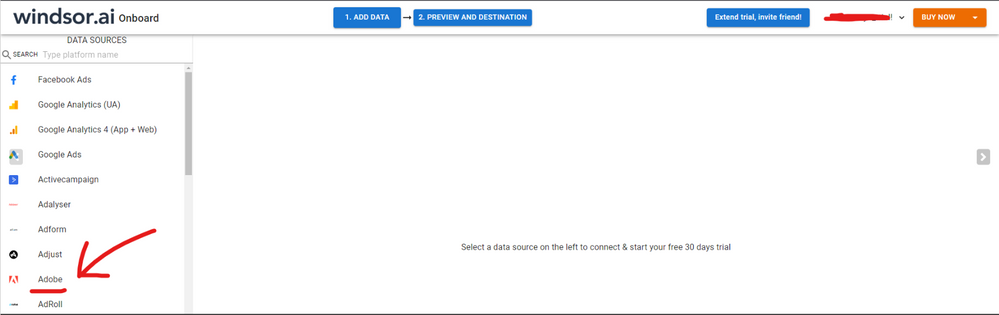
Hi @tomasmartinek were you able to find a solution? As a workaround, maybe you can connect your Adobe data using a 3dr partty connector. I use windsor.ai's Adobe connector and I can filter my data before exporting it to PBI, on a preview screen on the platform, without having to use the advance editor. When I export to PBI, my data is already filtered so it saves me a lot of time. In case you wonder, to make the connection first search for the Adobe connector in the data sources list:
Then, you should enter your Adobe credentials to make the connection. After that, you'll see a preview of your data where you can select the fields you want to see in PBI.
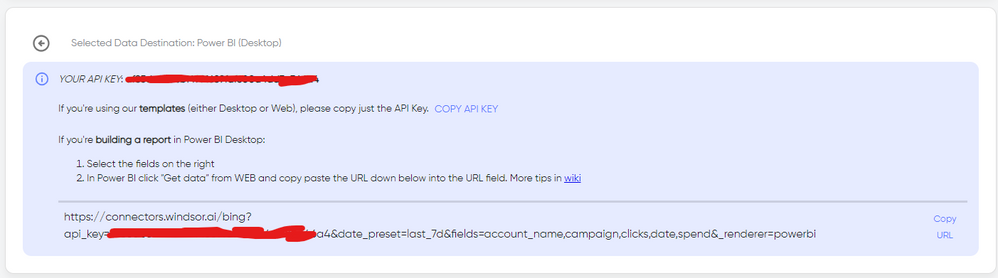
Finally, you just have to choose PBI as destination and copy and paste the url that will appear there in PBI desktop --> Get Data --Web > --> Paste the link
Hi @tomasmartinek ,
See the articles if it is helpful:
Power BI Introduction: Working with Parameters in Power BI Desktop —Part 4
Best Regards,
Stephen Tao
If this post helps, then please consider Accept it as the solution to help the other members find it more quickly.
Sign up to receive a private message when registration opens and key events begin.
If you have recently started exploring Fabric, we'd love to hear how it's going. Your feedback can help with product improvements.