Learn from the best! Meet the four finalists headed to the FINALS of the Power BI Dataviz World Championships! Register now
hello
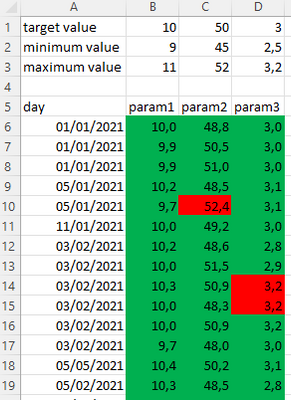
often coworker give me excel tables like that :
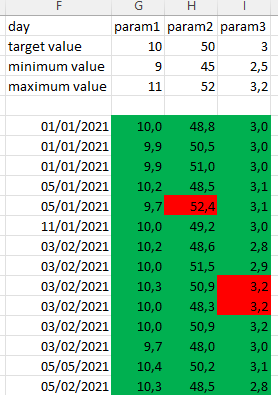
or better, like this :
The problem is that the specifications (as the minimum or maximum value) is in a big header.
Is there a way to keep the values of the specification for each parameter somewhere in powerbi without copying them on each time line for each parameter ?
Because after i want to do the comparison of the mean value by day and by parameter with the specification.
(Specification value is a number which should not change all the lines, so it is useless to recopy it each time... ?)
Thanks a lot
Solved! Go to Solution.
@Anonymous
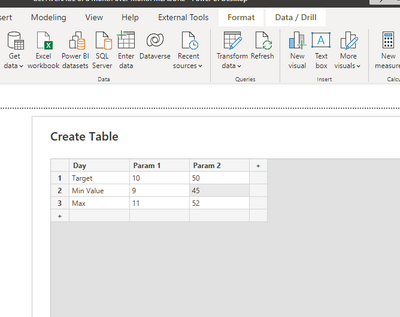
You can keep them in a table using the Enter Data option
⭕ Subscribe and learn Power BI from these videos
⚪ Website ⚪ LinkedIn ⚪ PBI User Group
@Anonymous
You can keep them in a table using the Enter Data option
⭕ Subscribe and learn Power BI from these videos
⚪ Website ⚪ LinkedIn ⚪ PBI User Group
i understand 😉 i have to have two differents tables.
I prefer to have these two tables automatically without enter by hand the specification table. So i cut my table in two, and it works 😉
Thanks, i accept your answer.
| User | Count |
|---|---|
| 5 | |
| 4 | |
| 3 | |
| 3 | |
| 3 |
| User | Count |
|---|---|
| 13 | |
| 8 | |
| 8 | |
| 7 | |
| 6 |