
cancel
Showing results for 
Search instead for 
Did you mean: 

Get Fabric Certified for FREE during Fabric Data Days. Don't miss your chance! Request now

Reply
maclura
Resolver I
Resolver I

New table from combination of two not related tables

Hi,


I have 2 tables like


Table1 = #table({"column1"},{{"1"},{"2"},{"3"}})
Table2 = #table({"column1"},{{"a"},{"b"}})


I would like to get this result


Table3 = #table({"column1","Column2"},{{"1","a"},{"2","a"},{"3","a"},{"1","b"},{"2","b"},{"3","b"}})


what is the best approach with M?


thank you

2 ACCEPTED SOLUTIONS
jppv20
Solution Sage
Solution Sage

Hi @maclura ,


This should work:

Go to PowerQuery, in both tables create a column which equals 1 for every row:

jppv20_0-1638287361638.png

jppv20_1-1638287370591.png


Go to merge queries, select the columns with 1 for every row and choose full outer join.

Expand column 2, this will be the result:

jppv20_2-1638287449256.png


If I answered your question, please mark it as a solution to help other members find it more quickly.


View solution in original post

AlexisOlson
Super User
Super User

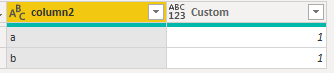
Another way to do this is to define a custom column "column2" on Table1 as Table2[column1].

AlexisOlson_0-1638292663030.png

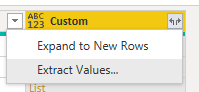
Then click the expand icon in the upper right corner of the above.


View solution in original post

4 REPLIES 4
AlexisOlson
Super User
Super User

Another way to do this is to define a custom column "column2" on Table1 as Table2[column1].

AlexisOlson_0-1638292663030.png

Then click the expand icon in the upper right corner of the above.


Thank you @AlexisOlson , it does work and it's even more elegant and versatile compared to the previous solution. You can choose if to expand the second column in new rows, or replicate the merging of the values of the second table in each row of the first table. That's powerful!

maclura_0-1638294253492.png

Thank you so much

maclura
Resolver I
Resolver I

It does work, thank you @jppv20 

jppv20
Solution Sage
Solution Sage

Hi @maclura ,


This should work:

Go to PowerQuery, in both tables create a column which equals 1 for every row:

jppv20_0-1638287361638.png

jppv20_1-1638287370591.png


Go to merge queries, select the columns with 1 for every row and choose full outer join.

Expand column 2, this will be the result:

jppv20_2-1638287449256.png


If I answered your question, please mark it as a solution to help other members find it more quickly.


Helpful resources

Announcements
November Power BI Update Carousel

Power BI Monthly Update - November 2025

Check out the November 2025 Power BI update to learn about new features.

Fabric Data Days Carousel

Fabric Data Days

Advance your Data & AI career with 50 days of live learning, contests, hands-on challenges, study groups & certifications and more!

FabCon Atlanta 2026 carousel

FabCon Atlanta 2026

Join us at FabCon Atlanta, March 16-20, for the ultimate Fabric, Power BI, AI and SQL community-led event. Save $200 with code FABCOMM.