Don't miss your chance to take the Fabric Data Engineer (DP-600) exam for FREE! Find out how by watching the DP-600 session on-demand now through April 28th.
Learn moreJoin the FabCon + SQLCon recap series. Up next: Power BI, Real-Time Intelligence, IQ and AI, and Data Factory take center stage. All sessions are available on-demand after the live show. Register now
Hi!
I've been struggling with this problem for a few days:
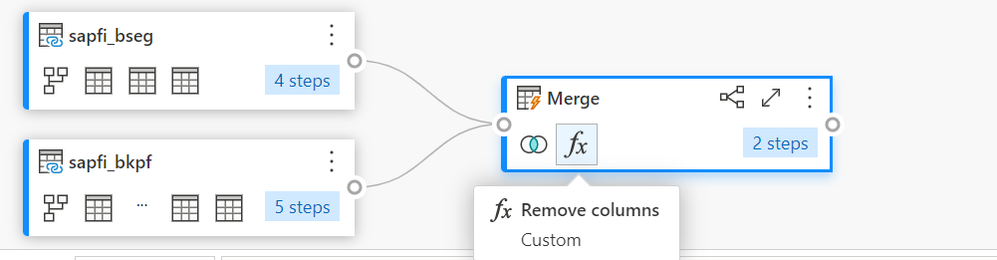
I want to join two tables with a merge (they have 4 common columns). I use an inner merge and then I save & close and, after that, Power Query itself creates a new remove function and they remove some of the columns I need. Even if I edit the tables and remove de function, when I save and close again, they automatically create the remove function again.
Can someone help me with this problem?
Thank you in advance!
Hi @fatima13 ,
My guess is that Power Query is doing this as an error-handling step to allow the query to load correctly.
Without being able to see the all the queries/code it's hard to be sure, but I'd check for duplicated column names as a result of the merge. This is particularly likely if you're using the Table.Join function rather than Table.NestedJoin.
Pete
Proud to be a Datanaut!
Check out the April 2026 Power BI update to learn about new features.
If you have recently started exploring Fabric, we'd love to hear how it's going. Your feedback can help with product improvements.
A new Power BI DataViz World Championship is coming this June! Don't miss out on submitting your entry.
| User | Count |
|---|---|
| 5 | |
| 3 | |
| 3 | |
| 3 | |
| 3 |
| User | Count |
|---|---|
| 8 | |
| 6 | |
| 5 | |
| 5 | |
| 4 |