Get certified for free when you join Fabric Data Days 2026 and dive into Fabric, Power BI, SQL, AI, and other essential data skills.
Join nowJuly 7 - July 17 | Round 2 of the Power BI Dataviz World Championships. Don't miss your chance! Learn more
Hi!
I've been struggling with this problem for a few days:
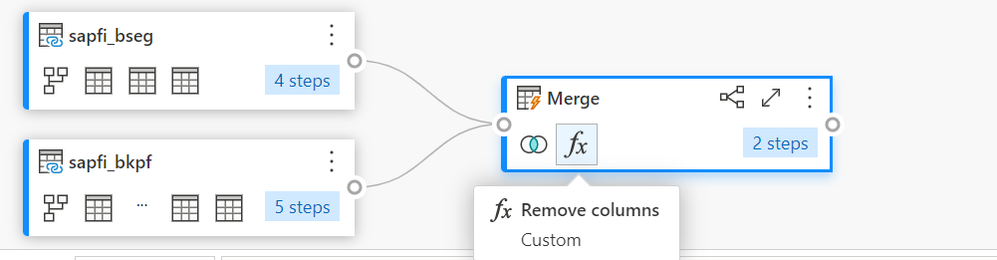
I want to join two tables with a merge (they have 4 common columns). I use an inner merge and then I save & close and, after that, Power Query itself creates a new remove function and they remove some of the columns I need. Even if I edit the tables and remove de function, when I save and close again, they automatically create the remove function again.
Can someone help me with this problem?
Thank you in advance!
Hi @fatima13 ,
My guess is that Power Query is doing this as an error-handling step to allow the query to load correctly.
Without being able to see the all the queries/code it's hard to be sure, but I'd check for duplicated column names as a result of the merge. This is particularly likely if you're using the Table.Join function rather than Table.NestedJoin.
Pete
Proud to be a Datanaut!
Join us in Barcelona for FabCon and SQLCon, the Fabric, Power BI, SQL, and AI community event. Save €200 with code FABCMTY200.
Join Fabric Data Days 2026: 60 days of free live/on-demand sessions, challenges, study groups, and certification opportunities.
| User | Count |
|---|---|
| 8 | |
| 5 | |
| 5 | |
| 4 | |
| 4 |