Don't miss your chance to take exam DP-600 or DP-700 on us!
Request nowLearn from the best! Meet the four finalists headed to the FINALS of the Power BI Dataviz World Championships! Register now
Hi Community,
I have created a desptop .pbix file which has following data connectors:
Google analytics
Excel file stored on the company server ( accessing the file via on-premises gateway )
My file works fine, but I can't refresh my files once uploaded to service.
Not only it stops me to schedulle a refresh but also stops to do a manual refresh.
The only solution working for now is to re-publish each time.
P.S.
a- If I remove the Google analytics data connector and keep just excel file, the excel file works fine via tha gateway and lets me perferm a schedule & refresh.
b- If I remove the excel file and keep just the google analyticd, again it works fine in all aspects on the published report in service.
As soon as I combine both in a report, the error I gets is gateway not defined.
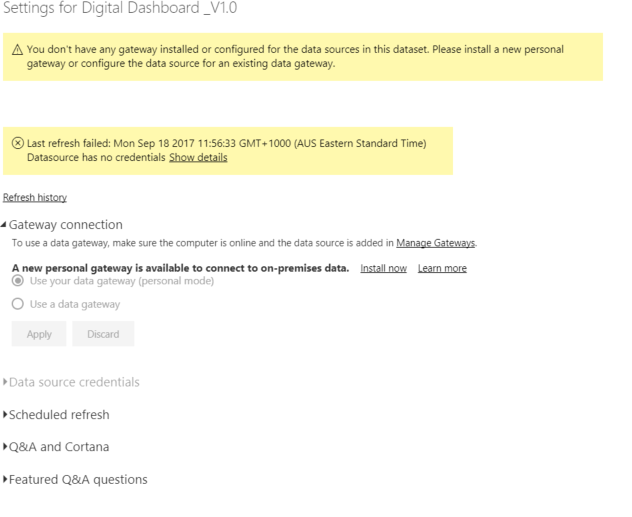
here is a snapshot of same file , when Google analytics connector is removed, the gateway starts wokring.
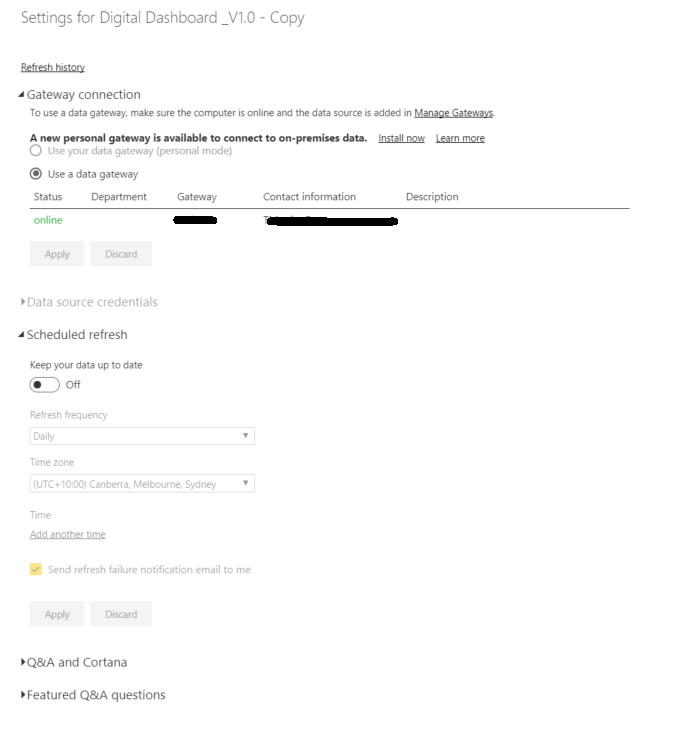
Note: the way around for now, I have created is to load the excel file on google docs and it is working.
Is there any requirement or limit on one file local with a web file in same report published can't be refreshed etc
any help, guidelines, material will be highly appriciated.
Thanks & Regards
Solved! Go to Solution.
Hi @Anonymous,
In your scenario, the dataset contains local Excel and Google Analytics data source, but the on-premise data gateway doesn't support OAuth authentication currently, so you are not able to configure the dataset to use data gateway. To work around the issue, please install and configure the On-premises data gateway (personal mode) for the dataset.
For more information, you can see this idea: Combine enterprise gateway and online data sources.
Best Regards,
Qiuyun Yu
Hi @Anonymous,
In your scenario, the dataset contains local Excel and Google Analytics data source, but the on-premise data gateway doesn't support OAuth authentication currently, so you are not able to configure the dataset to use data gateway. To work around the issue, please install and configure the On-premises data gateway (personal mode) for the dataset.
For more information, you can see this idea: Combine enterprise gateway and online data sources.
Best Regards,
Qiuyun Yu
Thanks @v-qiuyu-msft, this explains everything. The feature being released in next iteration, couldn't have asked for more 🙂
Share feedback directly with Fabric product managers, participate in targeted research studies and influence the Fabric roadmap.
Check out the February 2026 Power BI update to learn about new features.
| User | Count |
|---|---|
| 10 | |
| 9 | |
| 7 | |
| 5 | |
| 5 |