cancel
Showing results for 
Search instead for 
Did you mean: 

The Power BI Data Visualization World Championships is back! Get ahead of the game and start preparing now! Learn more

Reply
lazer1
New Member

Way to transform data from a pivoted like format into a more structured format

Hello,


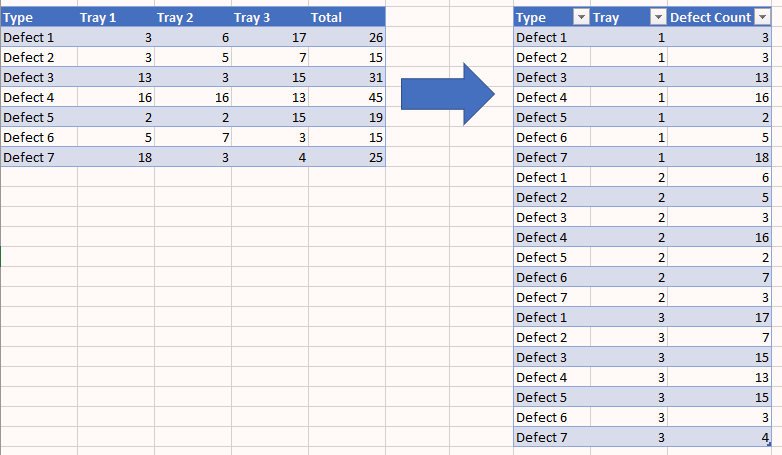
I am trying to figure out a way to use power query to transform a table of data into another. See pic below. I am trying to turn the table on the left into the table on the right. I was having trouble finding the right way to describe this, and was having a hard time finding if there were any already posted similar solutions. Any help is appreciated. Thanks!


2023-06-19 14_26_57-new way to query data - Excel.png


TypeTray 1Tray 2Tray 3Total
Defect 1361726
Defect 235715
Defect 31331531
Defect 416161345
Defect 5221519
Defect 657315
Defect 7183425
1 ACCEPTED SOLUTION
baghdadi62
Resolver III
Resolver III

1- Remove "Total" Column.

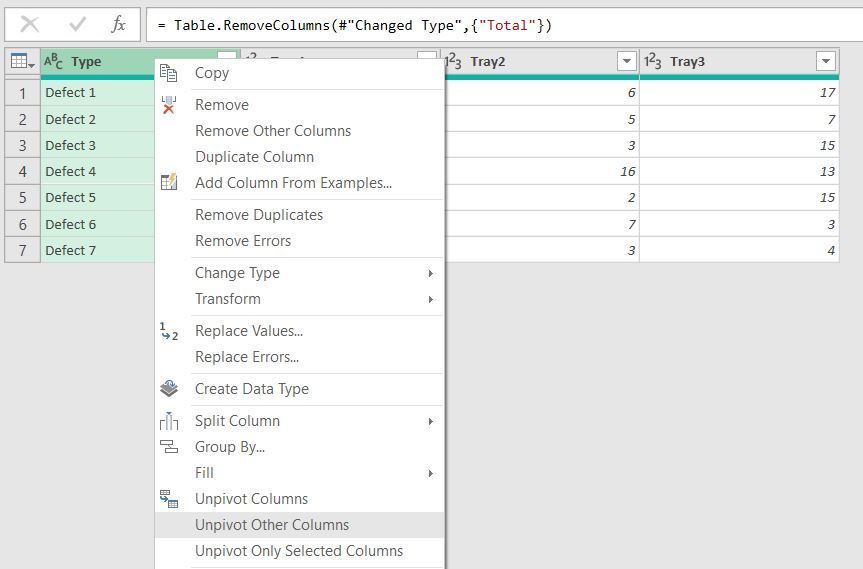
2- Right mouse click on Type column and select "Unpivot Other Columns".
3- Replace "Tray" With Empty String on "Attribute" Column.

Unpivot StepUnpivot Step


All steps:

All stepsAll steps

View solution in original post

4 REPLIES 4
baghdadi62
Resolver III
Resolver III

1- Remove "Total" Column.

2- Right mouse click on Type column and select "Unpivot Other Columns".
3- Replace "Tray" With Empty String on "Attribute" Column.

Unpivot StepUnpivot Step


All steps:

All stepsAll steps

Thank you!!!

I'm glad I could help.

Papermain
Frequent Visitor

let
    Source = Excel.CurrentWorkbook(){[Name="DefectTable"]}[Content],
    #"Changed Type" = Table.TransformColumnTypes(Source,{{"Type", type text}, {"Tray 1", Int64.Type}, {"Tray 2", Int64.Type}, {"Tray 3", Int64.Type}, {"Total", Int64.Type}}),
    #"Unpivoted Other Columns" = Table.UnpivotOtherColumns(#"Changed Type", {"Type"}, "Attribute", "Value"),
    #"Renamed Columns1" = Table.RenameColumns(#"Unpivoted Other Columns",{{"Value", "Defect count"}}),
    #"Renamed Columns" = Table.RenameColumns(#"Renamed Columns1",{{"Attribute", "Tray"}}),
    #"Lowercased Text" = Table.TransformColumns(#"Renamed Columns",{{"Tray", Text.Lower, type text}}),
    #"Replaced Value" = Table.ReplaceValue(#"Lowercased Text","tray","",Replacer.ReplaceText,{"Tray"}),
    #"Filtered Rows" = Table.SelectRows(#"Replaced Value", each ([Tray] <> "total")),
    #"Trimmed Text" = Table.TransformColumns(#"Filtered Rows",{{"Tray", Text.Trim, type text}})
in
    #"Trimmed Text"

Helpful resources

Announcements
Power BI DataViz World Championships

Power BI Dataviz World Championships

The Power BI Data Visualization World Championships is back! Get ahead of the game and start preparing now!

December 2025 Power BI Update Carousel

Power BI Monthly Update - December 2025

Check out the December 2025 Power BI Holiday Recap!

FabCon Atlanta 2026 carousel

FabCon Atlanta 2026

Join us at FabCon Atlanta, March 16-20, for the ultimate Fabric, Power BI, AI and SQL community-led event. Save $200 with code FABCOMM.