cancel
Showing results for 
Search instead for 
Did you mean: 

A new Data Days event is coming soon! This time we’re going bigger than ever. Fabric, Power BI, SQL, AI and more. Don't miss out.

Reply
Vanessa250919
Helper V
Helper V

Visual card All mention

Hello, I have one question about the CARD visualisation, I need to show the agent name, but when I don't used a filter I see the First Agent Name, it's possible to add the mention "All" in the CARD visualistion ? 


thanks !! 

1 ACCEPTED SOLUTION
Pragati11
Super User
Super User

Hi @Vanessa250919 ,


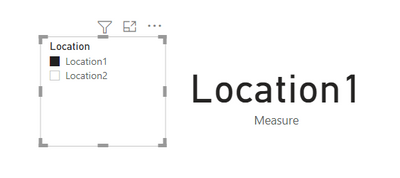
I am taking following sample data where I have a field named Location as a slicer and a card visual with this value:

Pragati11_1-1624562713409.png

When I select anything in the slicer that value is displayed in the card visual.

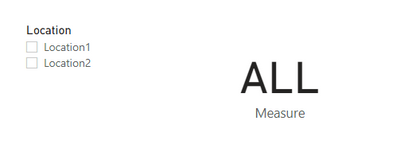
If I understand your requirement correctly, you want to display ALL in the card visual when nothing is selected in the slicer.

for that create the following measure:

Measure =
var t1 = SELECTEDVALUE('Table'[Location])
RETURN
IF(t1 = BLANK(), "ALL", t1)
 
Move this measure to card visual. Now if you don't select anything in the slicer, card visual shows ALL as below:
Pragati11_2-1624562854542.png

Make sure to use your column name in the above measure.


Let me know if this is what you were looking for.


Thanks,

Pragati


Best Regards,

Pragati Jain


MVP logo


LinkedIn | Twitter | Blog YouTube 

Did I answer your question? Mark my post as a solution! This will help others on the forum!

Appreciate your Kudos!!

Proud to be a Super User!!

View solution in original post

2 REPLIES 2
Pragati11
Super User
Super User

Hi @Vanessa250919 ,


I am taking following sample data where I have a field named Location as a slicer and a card visual with this value:

Pragati11_1-1624562713409.png

When I select anything in the slicer that value is displayed in the card visual.

If I understand your requirement correctly, you want to display ALL in the card visual when nothing is selected in the slicer.

for that create the following measure:

Measure =
var t1 = SELECTEDVALUE('Table'[Location])
RETURN
IF(t1 = BLANK(), "ALL", t1)
 
Move this measure to card visual. Now if you don't select anything in the slicer, card visual shows ALL as below:
Pragati11_2-1624562854542.png

Make sure to use your column name in the above measure.


Let me know if this is what you were looking for.


Thanks,

Pragati


Best Regards,

Pragati Jain


MVP logo


LinkedIn | Twitter | Blog YouTube 

Did I answer your question? Mark my post as a solution! This will help others on the forum!

Appreciate your Kudos!!

Proud to be a Super User!!

its perfect thanks ! 

Helpful resources

Announcements
May Power BI Update Carousel

Power BI Monthly Update - May 2026

Check out the May 2026 Power BI update to learn about new features.

Fabric SQL PBI Data Days

Data Days 2026 coming soon!

Sign up to receive a private message when registration opens and key events begin.

New to Fabric survey Carousel

New to Fabric Survey

If you have recently started exploring Fabric, we'd love to hear how it's going. Your feedback can help with product improvements.

Power BI DataViz World Championships carousel

Power BI DataViz World Championships - June 2026

A new Power BI DataViz World Championship is coming this June! Don't miss out on submitting your entry.