cancel
Showing results for 
Search instead for 
Did you mean: 

July 28 - August 9 | Final Round of the Power BI Dataviz World Championships. This is your chance. Learn more

Reply
Vanessa250919
Helper V
Helper V

Visual card All mention

Hello, I have one question about the CARD visualisation, I need to show the agent name, but when I don't used a filter I see the First Agent Name, it's possible to add the mention "All" in the CARD visualistion ? 


thanks !! 

1 ACCEPTED SOLUTION
Pragati11
Super User
Super User

Hi @Vanessa250919 ,


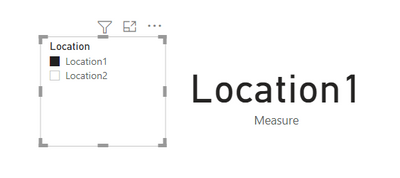
I am taking following sample data where I have a field named Location as a slicer and a card visual with this value:

Pragati11_1-1624562713409.png

When I select anything in the slicer that value is displayed in the card visual.

If I understand your requirement correctly, you want to display ALL in the card visual when nothing is selected in the slicer.

for that create the following measure:

Measure =
var t1 = SELECTEDVALUE('Table'[Location])
RETURN
IF(t1 = BLANK(), "ALL", t1)
 
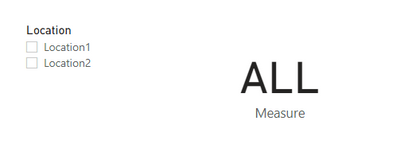
Move this measure to card visual. Now if you don't select anything in the slicer, card visual shows ALL as below:
Pragati11_2-1624562854542.png

Make sure to use your column name in the above measure.


Let me know if this is what you were looking for.


Thanks,

Pragati


Best Regards,

Pragati Jain


MVP logo


LinkedIn | Twitter | Blog YouTube 

Did I answer your question? Mark my post as a solution! This will help others on the forum!

Appreciate your Kudos!!

Proud to be a Super User!!

View solution in original post

2 REPLIES 2
Pragati11
Super User
Super User

Hi @Vanessa250919 ,


I am taking following sample data where I have a field named Location as a slicer and a card visual with this value:

Pragati11_1-1624562713409.png

When I select anything in the slicer that value is displayed in the card visual.

If I understand your requirement correctly, you want to display ALL in the card visual when nothing is selected in the slicer.

for that create the following measure:

Measure =
var t1 = SELECTEDVALUE('Table'[Location])
RETURN
IF(t1 = BLANK(), "ALL", t1)
 
Move this measure to card visual. Now if you don't select anything in the slicer, card visual shows ALL as below:
Pragati11_2-1624562854542.png

Make sure to use your column name in the above measure.


Let me know if this is what you were looking for.


Thanks,

Pragati


Best Regards,

Pragati Jain


MVP logo


LinkedIn | Twitter | Blog YouTube 

Did I answer your question? Mark my post as a solution! This will help others on the forum!

Appreciate your Kudos!!

Proud to be a Super User!!

its perfect thanks ! 

Helpful resources

Announcements
FabCon and SQLCon Barcelona 2026

FabCon & SQLCon – Barcelona 2026

Join us in Barcelona for FabCon and SQLCon, the Fabric, Power BI, SQL, and AI community event. Save €200 with code FABCMTY200.

Fabric Community Sticker Design Challenge Barcelona Carousel

Fabric Community Sticker Challenge - Barcelona 2026

If you love stickers, then you will definitely want to check out our community sticker challenge, Barcelona edition!

July Power BI Update Carousel

Power BI Monthly Update - July 2026

Check out the July 2026 Power BI update to learn about new features.

Power BI DataViz World Championships carousel

Power BI DataViz World Championships - June 2026

A new Power BI DataViz World Championship is coming this June! Don't miss out on submitting your entry.