cancel
Showing results for 
Search instead for 
Did you mean: 

Try your skills in the Power BI Dataviz World Championship! Round one ends June 26. Join now

Reply
gadao
Frequent Visitor

Use Parameter as Query Reference in Source

I have query (query 1) that performs a lot of steps to correct the dataset, I load it to excel and then I loaded it back to PQ, Now I use this query (query_1) to perform other corrections, which give me some performance while I do the subsequent query steps.


But in the future I will change to query 1 and discard query_1...


The thing is, I would like to use a Parameter to rapidily change the reference.

Without using a parameter:

let

Source = #"query 1"

in

Source


I want to use the parameter value in the blue highlighted text.


1 ACCEPTED SOLUTION
v-angzheng-msft
Community Support
Community Support

Hi, @gadao 

You can try the following solution:

1. create a custom fuction SwitchQuery:

(query as table)=>
let 
source = query
in source

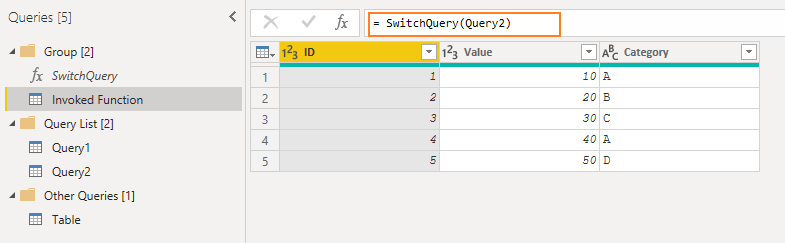
2. Invoked fuction:

let
    Source = SwitchQuery(Query2)
in
    Source

 2. for the Main table:

let
    Source = #"Invoked Function"
in
    Source

You only need to change the query of the invoked function to change the query of the main table at any time.

 Result:

vangzhengmsft_0-1648532491847.png

Please refer to the attachment below for details.

Hope this helps.


Best Regards,
Community Support Team _ Zeon Zheng


If this post helps, then please consider Accept it as the solution to help the other members find it more quickly.

View solution in original post

3 REPLIES 3
v-angzheng-msft
Community Support
Community Support

Hi, @gadao 

You can try the following solution:

1. create a custom fuction SwitchQuery:

(query as table)=>
let 
source = query
in source

2. Invoked fuction:

let
    Source = SwitchQuery(Query2)
in
    Source

 2. for the Main table:

let
    Source = #"Invoked Function"
in
    Source

You only need to change the query of the invoked function to change the query of the main table at any time.

 Result:

vangzhengmsft_0-1648532491847.png

Please refer to the attachment below for details.

Hope this helps.


Best Regards,
Community Support Team _ Zeon Zheng


If this post helps, then please consider Accept it as the solution to help the other members find it more quickly.

ilton
Helper I
Helper I

Hi @gadao 

Are you trying to use a variable to select wich query is going to be executed?

If so, you can use a function that reads the parameter and selects the quey.


If this helps onsider marking it as a solution


gadao
Frequent Visitor

I think isn't that...


Let me put this way, let's say I have two queries in PQE and then i created a blank query.


If I write: let Source = #"Query1" in Source | it will show the data from Query1 if I change the code for Query2 it will show the data in Query 2,


I want a switcher to make this change using a parameter or any other thing.

Helpful resources

Announcements
Fabric Data Days is here Carousel

Fabric Data Days 2026

Don't miss out on Data Days, June 15 through August 7. Learn Fabric, Power BI, SQL, AI and more.

Power BI DataViz World Championships carousel

Power BI DataViz World Championships - June 2026

A new Power BI DataViz World Championship is coming this June! Don't miss out on submitting your entry.