Don't miss your chance to take the Fabric Data Engineer (DP-700) exam on us!
Learn moreNext up in the FabCon + SQLCon recap series: The roadmap for Microsoft SQL and Maximizing Developer experiences in Fabric. All sessions are available on-demand after the live show. Register now
Hi everyone...
I'm looking for guidance on how to unpivot the below table so I end up with the Title column, then one each of the Platform Impacted, Vendor Used, and Vendor Spend columns.
Thanks in advance to anyone who can assist here.
Solved! Go to Solution.
You can unpivot the non-Title columns,
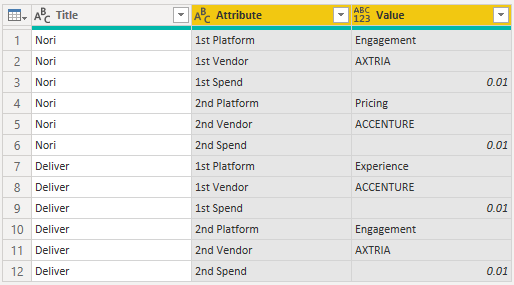
split the attribute column into 1st/2nd and attribute
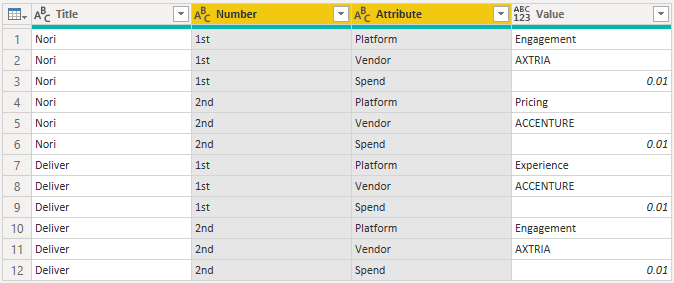
then pivot back

Here's the full sample query you can paste into the Advanced Editor of a new blank query:
let
Source = Table.FromRows(Json.Document(Binary.Decompress(Binary.FromText("i45W8ssvylTSUXLNS09MT81NzSsBchwjQoI8HYEMAz0DQyAVUJSZnJmXDpJxdnb1CwkNcoVJxupEK7mk5mSWpRaBTKkoSC3KTM1LTsWmFq8tsbEA", BinaryEncoding.Base64), Compression.Deflate)), let _t = ((type nullable text) meta [Serialized.Text = true]) in type table [Title = _t, #"1st Platform" = _t, #"1st Vendor" = _t, #"1st Spend" = _t, #"2nd Platform" = _t, #"2nd Vendor" = _t, #"2nd Spend" = _t]),
#"Unpivoted Columns" = Table.UnpivotOtherColumns(Source, {"Title"}, "Attribute", "Value"),
#"Split Column by Delimiter" = Table.SplitColumn(#"Unpivoted Columns", "Attribute", Splitter.SplitTextByEachDelimiter({" "}, QuoteStyle.Csv, false), {"Number", "Attribute"}),
#"Pivoted Column" = Table.Pivot(#"Split Column by Delimiter", List.Distinct(#"Split Column by Delimiter"[Attribute]), "Attribute", "Value")
in
#"Pivoted Column"
NewStep=#table({"Title","Platform Impacted","Vendor Used","Venor Spend"},List.TransformMany(Table.ToRows(PreviousSeptName),each List.Split(List.Skip(_),3),(x,y)=>{x{0}}&y))
I'm not quite sure I understand. Can you show what the desired result should look like?
You can unpivot the non-Title columns,
split the attribute column into 1st/2nd and attribute
then pivot back
Here's the full sample query you can paste into the Advanced Editor of a new blank query:
let
Source = Table.FromRows(Json.Document(Binary.Decompress(Binary.FromText("i45W8ssvylTSUXLNS09MT81NzSsBchwjQoI8HYEMAz0DQyAVUJSZnJmXDpJxdnb1CwkNcoVJxupEK7mk5mSWpRaBTKkoSC3KTM1LTsWmFq8tsbEA", BinaryEncoding.Base64), Compression.Deflate)), let _t = ((type nullable text) meta [Serialized.Text = true]) in type table [Title = _t, #"1st Platform" = _t, #"1st Vendor" = _t, #"1st Spend" = _t, #"2nd Platform" = _t, #"2nd Vendor" = _t, #"2nd Spend" = _t]),
#"Unpivoted Columns" = Table.UnpivotOtherColumns(Source, {"Title"}, "Attribute", "Value"),
#"Split Column by Delimiter" = Table.SplitColumn(#"Unpivoted Columns", "Attribute", Splitter.SplitTextByEachDelimiter({" "}, QuoteStyle.Csv, false), {"Number", "Attribute"}),
#"Pivoted Column" = Table.Pivot(#"Split Column by Delimiter", List.Distinct(#"Split Column by Delimiter"[Attribute]), "Attribute", "Value")
in
#"Pivoted Column"

If you have recently started exploring Fabric, we'd love to hear how it's going. Your feedback can help with product improvements.
A new Power BI DataViz World Championship is coming this June! Don't miss out on submitting your entry.
Share feedback directly with Fabric product managers, participate in targeted research studies and influence the Fabric roadmap.
| User | Count |
|---|---|
| 6 | |
| 3 | |
| 3 | |
| 3 | |
| 2 |
| User | Count |
|---|---|
| 7 | |
| 6 | |
| 5 | |
| 5 | |
| 5 |

