
cancel
Showing results for 
Search instead for 
Did you mean: 

The Power BI Data Visualization World Championships is back! Get ahead of the game and start preparing now! Learn more

Reply
fox252
Frequent Visitor

Unexpected/ Strange Column References

Hello,


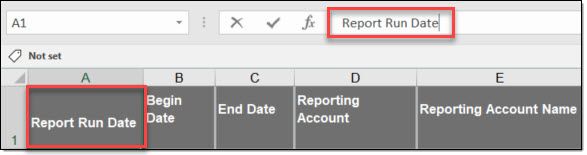
I'm experiencing a weird occurrence with column references. The source file comes from an internal reporting portal as .xls ( I know, not ideal). As seen in the Excel screen shot, there are no spaces/ char after the column name. In PQ preview pane header, no issue. It's only when I reference the column I get "{Col Name}#(1f)". If I manually add the #(1f) to the end of the {Col Name}, results in a sytax error. I need to copy it from another step and paste, then no issue. Any idea what is happening here? Maybe something is inbedded in the Excel that I cannot see.

 2022-04-08_11-20-08.jpg2022-04-08_11-18-17.jpg

1 ACCEPTED SOLUTION

In your Excel, put following formula

=CODE(RIGHT(A1,1)) 

where A1 is that cell header.

You should get the answer - 10

Character 10 is line break character in Excel. This is simulated by pressing ALT+Enter at the end of the line to go to next line.

Hence, if yout type Yearly and press ALT+ENTER, you will go to next line and type Revenue.

You will see following in place of Yearly Revenue

Yearly
Revenue


The official name of Character 10 is Line Feed, hence in PQ, you need to write lf.

View solution in original post

3 REPLIES 3
Vijay_A_Verma
Super User
Super User

Looks like you used 1 in place of small case L in #(lf)...Could you check this out?

It was in fact an "l" as opposed to "1", they look awfully similar in PQ pane.


The bigger question though is why that suffix on col name?

In your Excel, put following formula

=CODE(RIGHT(A1,1)) 

where A1 is that cell header.

You should get the answer - 10

Character 10 is line break character in Excel. This is simulated by pressing ALT+Enter at the end of the line to go to next line.

Hence, if yout type Yearly and press ALT+ENTER, you will go to next line and type Revenue.

You will see following in place of Yearly Revenue

Yearly
Revenue


The official name of Character 10 is Line Feed, hence in PQ, you need to write lf.

Helpful resources

Announcements
Power BI DataViz World Championships

Power BI Dataviz World Championships

The Power BI Data Visualization World Championships is back! Get ahead of the game and start preparing now!

December 2025 Power BI Update Carousel

Power BI Monthly Update - December 2025

Check out the December 2025 Power BI Holiday Recap!

FabCon Atlanta 2026 carousel

FabCon Atlanta 2026

Join us at FabCon Atlanta, March 16-20, for the ultimate Fabric, Power BI, AI and SQL community-led event. Save $200 with code FABCOMM.