Hi,
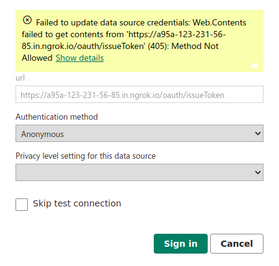
I need to send a POST request to generate an access token in Power Query. In Power BI Desktop, a POST request is sent, and it works as expected. However, when I try to refresh after publishing the report to Power BI Service, a GET request is sent instead, resulting in a "Method Not Allowed" error, and a response code of 405.
This is the error I have encountered.
This is the Power Query code I’m using
let
    base_url = [base_url],
    client_secret = [client_secret],
    Source  = Json.Document(Web.Contents(base_url&"/oauth/issueToken",
        [
          Headers = [#"Content-Type"="application/json"],
          Content=Json.FromValue([
            grant_type = "client_credentials",
            client_id = "powerbi_client",
            client_secret = client_secret
          ])
        ]
    )),

    token = Source[access_token],
I'm uncertain if the problem lies with the headers and content we are using. However, I was able to send the request successfully via Postman by setting the "Content-Type" to "application/json". What’s the issue here? Any issue with my script?


