cancel
Showing results for 
Search instead for 
Did you mean: 

Level up your Power BI skills this month - build one visual each week and tell better stories with data! Get started

Reply
Anonymous
Not applicable

Two value types in one column

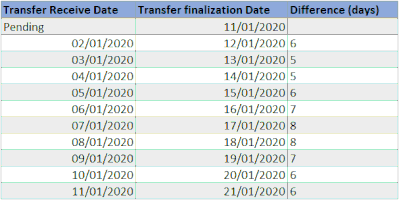
Hi! I have two columns in a self-referencing table tracker, both with dates (01/12/2020 format) and strings (e.g. “Pending”). How to preserve both different types considering that another column makes a calculation on those two (date difference)?


(this is what I would like to achieve)

2020-04-25-New CeT tracker - Excel.gif


My two attempts:

  1. Set a date type: string disappears at refresh
  2. Set a general or string type: calculation won’t be done

Maybe there is some way to perform the calculation in a different way? I'm using


= (StartDate as date, EndDate as date, optional Holidays as list) =>
let
    ListOfDates = List.Dates(StartDate,Number.From(EndDate-StartDate),#duration(1,0,0,0)),
    DeleteHolidays = if Holidays = null then ListOfDates else List.Difference(ListOfDates, Holidays),
    DeleteWeekends = List.Select(DeleteHolidays, each Date.DayOfWeek(_,1) < 5 ),
    CountDays = List.Count(DeleteWeekends)
in
    CountDays


Thanks for your invaluable help.

1 ACCEPTED SOLUTION
v-frfei-msft
Community Support
Community Support

Hi @Anonymous ,

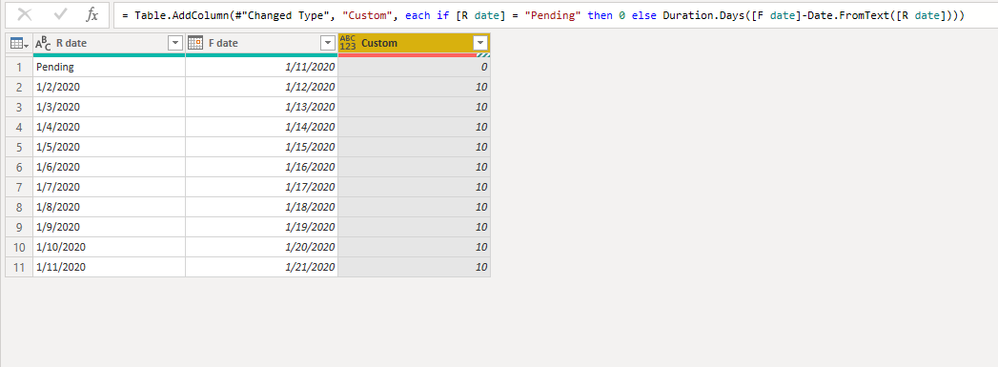
We can create a custom column like that.

if [R date] = "Pending" then 0 else Duration.Days([F date]-Date.FromText([R date]))

Capture.PNG

M query for your reference.

let
    Source = Table.FromRows(Json.Document(Binary.Decompress(Binary.FromText("Vc87CoAwEADRu6QOJLv538I+pFPEJvcvFUUcy+FV07tZtrkeczfWiBNx6tWbYftV+sQNSgiAQIiASEiARMiATCiAQqiASmiARhD/ifqfCOR9Hyc=", BinaryEncoding.Base64), Compression.Deflate)), let _t = ((type text) meta [Serialized.Text = true]) in type table [#"R date" = _t, #"F date" = _t]),
    #"Changed Type" = Table.TransformColumnTypes(Source,{{"R date", type text}, {"F date", type date}}),
    #"Added Custom" = Table.AddColumn(#"Changed Type", "Custom", each if [R date] = "Pending" then 0 else Duration.Days([F date]-Date.FromText([R date])))
in
    #"Added Custom"


Community Support Team _ Frank
If this post helps, then please consider Accept it as the solution to help the others find it more quickly.

View solution in original post

3 REPLIES 3
v-frfei-msft
Community Support
Community Support

Hi @Anonymous ,

We can create a custom column like that.

if [R date] = "Pending" then 0 else Duration.Days([F date]-Date.FromText([R date]))

Capture.PNG

M query for your reference.

let
    Source = Table.FromRows(Json.Document(Binary.Decompress(Binary.FromText("Vc87CoAwEADRu6QOJLv538I+pFPEJvcvFUUcy+FV07tZtrkeczfWiBNx6tWbYftV+sQNSgiAQIiASEiARMiATCiAQqiASmiARhD/ifqfCOR9Hyc=", BinaryEncoding.Base64), Compression.Deflate)), let _t = ((type text) meta [Serialized.Text = true]) in type table [#"R date" = _t, #"F date" = _t]),
    #"Changed Type" = Table.TransformColumnTypes(Source,{{"R date", type text}, {"F date", type date}}),
    #"Added Custom" = Table.AddColumn(#"Changed Type", "Custom", each if [R date] = "Pending" then 0 else Duration.Days([F date]-Date.FromText([R date])))
in
    #"Added Custom"


Community Support Team _ Frank
If this post helps, then please consider Accept it as the solution to help the others find it more quickly.
Anonymous
Not applicable

hi @v-frfei-msft,


this is what I needed. Thanks so much! 🙂


I've amended it a bit because I had to exclude weekends and holidays. I'm leaving part of the code for future reference:

...
#"Invoked Custom Function" = Table.AddColumn(#"Added Conditional Column", "CeT Performance", each if [Transfer Receive Date] = "Pending" then "0" else Datediff(Date.FromText([Transfer Receive Date]), [Transfer finalization Date], holidays[Holiday]))
...

DATEDIFF:
= (StartDate as date, EndDate as date, optional Holidays as list) =>
let
    ListOfDates = List.Dates(StartDate,Number.From(EndDate-StartDate),#duration(1,0,0,0)),
    DeleteHolidays = if Holidays = null then ListOfDates else List.Difference(ListOfDates, Holidays),
    DeleteWeekends = List.Select(DeleteHolidays, each Date.DayOfWeek(_,1) < 5 ),
    CountDays = List.Count(DeleteWeekends)
in
    CountDays


Geradav
Responsive Resident
Responsive Resident

Hi @Anonymous 


It is not a good practice to mix data types in a column. It is recommended to only have 1 data type per column. Otherwise, you are going to have a lot of errors in your queries.

Separate both results in different columns.


Let us know how that works


Best


David

Helpful resources

Announcements
April Power BI Update Carousel

Power BI Monthly Update - April 2026

Check out the April 2026 Power BI update to learn about new features.

Fabric SQL PBI Data Days

Data Days 2026 coming soon!

Sign up to receive a private message when registration opens and key events begin.

New to Fabric survey Carousel

New to Fabric Survey

If you have recently started exploring Fabric, we'd love to hear how it's going. Your feedback can help with product improvements.

Power BI DataViz World Championships carousel

Power BI DataViz World Championships - June 2026

A new Power BI DataViz World Championship is coming this June! Don't miss out on submitting your entry.

Top Kudoed Authors