Join us at FabCon Atlanta from March 16 - 20, 2026, for the ultimate Fabric, Power BI, AI and SQL community-led event. Save $200 with code FABCOMM.
Register now!Get Fabric Certified for FREE during Fabric Data Days. Don't miss your chance! Request now
Hi everyone,
I'm looking for a way to resort the data in Power Query as the following:
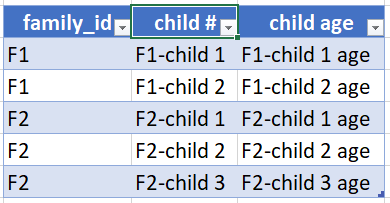
Original data example:
Intended result:
Any idea would be appreciated.
Thanks,
Solved! Go to Solution.
This is possible but the resulting table will be more difficult to work with. I'd recommend keeping the data unpivoted in your data model (you can always pivot it in a report visual). If you need a table with unique rows per family_id, then I'd recommend creating a related family dimension table.
If you really need to do this for some reason, here's one possible method:
let
Source = Table.FromRows(Json.Document(Binary.Decompress(Binary.FromText("i45WcjNU0gESuskZmTkpCqgchcT0VKVYHXRFRigchCKwuBGySUaYJqEoQuXgUGSMwoEoigUA", BinaryEncoding.Base64), Compression.Deflate)), let _t = ((type nullable text) meta [Serialized.Text = true]) in type table [family_id = _t, #"child #" = _t, #"child age" = _t]),
#"Grouped Rows" = Table.Group(Source, {"family_id"}, {{"Count", Table.RowCount, Int64.Type}, {"Collapse Rows", each Text.Combine(List.Union(List.Zip({[#"child #"], [child age]})), ", "), type text}}),
maxCount = List.Max(#"Grouped Rows"[Count]),
ColNames = List.Union(List.Transform({1..maxCount}, each {"child #" & Number.ToText(_), "child age " & Number.ToText(_)})),
#"Expand to Columns" = Table.SplitColumn(#"Grouped Rows", "Collapse Rows", Splitter.SplitTextByDelimiter(", "), ColNames)
in
#"Expand to Columns"
Result:

This is possible but the resulting table will be more difficult to work with. I'd recommend keeping the data unpivoted in your data model (you can always pivot it in a report visual). If you need a table with unique rows per family_id, then I'd recommend creating a related family dimension table.
If you really need to do this for some reason, here's one possible method:
let
Source = Table.FromRows(Json.Document(Binary.Decompress(Binary.FromText("i45WcjNU0gESuskZmTkpCqgchcT0VKVYHXRFRigchCKwuBGySUaYJqEoQuXgUGSMwoEoigUA", BinaryEncoding.Base64), Compression.Deflate)), let _t = ((type nullable text) meta [Serialized.Text = true]) in type table [family_id = _t, #"child #" = _t, #"child age" = _t]),
#"Grouped Rows" = Table.Group(Source, {"family_id"}, {{"Count", Table.RowCount, Int64.Type}, {"Collapse Rows", each Text.Combine(List.Union(List.Zip({[#"child #"], [child age]})), ", "), type text}}),
maxCount = List.Max(#"Grouped Rows"[Count]),
ColNames = List.Union(List.Transform({1..maxCount}, each {"child #" & Number.ToText(_), "child age " & Number.ToText(_)})),
#"Expand to Columns" = Table.SplitColumn(#"Grouped Rows", "Collapse Rows", Splitter.SplitTextByDelimiter(", "), ColNames)
in
#"Expand to Columns"
Result:
Check out the November 2025 Power BI update to learn about new features.
Advance your Data & AI career with 50 days of live learning, contests, hands-on challenges, study groups & certifications and more!
| User | Count |
|---|---|
| 10 | |
| 9 | |
| 6 | |
| 5 | |
| 3 |