cancel
Showing results for 
Search instead for 
Did you mean: 

Vote for your favorite vizzies from the Power BI Dataviz World Championship submissions. Vote now!

Reply
jflores
Frequent Visitor

Transpose Head Banger

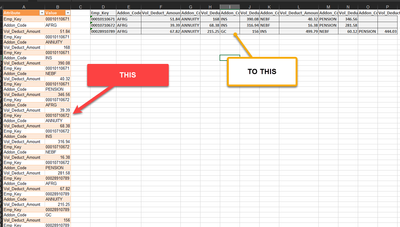
I've been at this for days so I'm hoping someone out there can help.  Basically I'm trying to do the following

jflores_0-1660728236035.png

I've tried every combination of Pivot/Unpivot steps I can think of.  Please help!  Thank You.

1 ACCEPTED SOLUTION
v-kkf-msft
Community Support
Community Support

Hi @jflores ,


Please try the code.


let
    Source = Table.FromRows(Json.Document(Binary.Decompress(Binary.FromText("ldJNa8MwDIDh/+JzEZK/Yh+zLi1h4I62G4wQclhyW5sd2sP+fUPPljNdLXgwetV1qrn8Dm/Tn9ooRCQkQl+R6jedqsdxvg7beZyWYb077p+vn/PP8DqN9+/bUF/m+/W2DB1BsM/pf7WUPtrzFwuSDxKuTSeWMhEBRVpqXnYsZxGMlmjvTTq1h8T/z3pwnhW1MIWJYKJIW0nhAxh+fRmwGIM8RP5SMloxxqLJ/rYWQwcClxF1iIRViMIYvoKQOZaCthJDkwPtJOJ+y28vd3a8VOpqY4Qqc3a8VuzqEUi0t7Wu1lpAo/r+AQ==", BinaryEncoding.Base64), Compression.Deflate)), let _t = ((type nullable text) meta [Serialized.Text = true]) in type table [Attribute = _t, Value = _t]),
    #"Added Index" = Table.AddIndexColumn(Source, "Index", 1, 1, Int64.Type),
    #"Added Custom" = Table.AddColumn(#"Added Index", "Custom", each Number.RoundDown([Index]/3.000009)),
    #"Renamed Columns" = Table.RenameColumns(#"Added Custom",{{"Attribute", "Name"}}),
    #"Grouped Rows" = Table.Group(#"Renamed Columns", {"Custom"}, {{"all", each  Record.FromTable(_)}}),
    #"Expanded all" = Table.ExpandRecordColumn(#"Grouped Rows", "all", {"Emp_Key", "Addon_Code", "Vol_Deduct_Amount"}, {"Emp_Key", "Addon_Code", "Vol_Deduct_Amount"}),
    #"Grouped Rows1" = Table.Group(#"Expanded all", {"Emp_Key"}, {{"Combine", each List.Combine( List.Zip({[Addon_Code], [Vol_Deduct_Amount]})) }}),
    #"Extracted Values" = Table.TransformColumns(#"Grouped Rows1", {"Combine", each Text.Combine(List.Transform(_, Text.From), ","), type text}),
    #"Split Column by Delimiter" = Table.SplitColumn(#"Extracted Values", "Combine", Splitter.SplitTextByDelimiter(",", QuoteStyle.Csv), {"Addon_Code", "Vol_Deduct_Amount", "Addon_Code.2", "Vol_Deduct_Amount.2", "Addon_Code.3", "Vol_Deduct_Amount.3", "Addon_Code.4", "Vol_Deduct_Amount.4", "Addon_Code.5", "Vol_Deduct_Amount.5", "Addon_Code.6", "Vol_Deduct_Amount.6"}),
    #"Changed Type" = Table.TransformColumnTypes(#"Split Column by Delimiter",{{"Addon_Code", type text}, {"Vol_Deduct_Amount", type number}, {"Addon_Code.2", type text}, {"Vol_Deduct_Amount.2", type number}, {"Addon_Code.3", type text}, {"Vol_Deduct_Amount.3", type number}, {"Addon_Code.4", type text}, {"Vol_Deduct_Amount.4", type number}, {"Addon_Code.5", type text}, {"Vol_Deduct_Amount.5", type number}, {"Addon_Code.6", type text}, {"Vol_Deduct_Amount.6", type number}})
in
    #"Changed Type"

vkkfmsft_0-1661149351943.png


If the problem is still not resolved, please provide detailed error information or the expected result you expect. Let me know immediately, looking forward to your reply.
Best Regards,
Winniz
If this post helps, then please consider Accept it as the solution to help the other members find it more quickly.

View solution in original post

3 REPLIES 3
v-kkf-msft
Community Support
Community Support

Hi @jflores ,


Please try the code.


let
    Source = Table.FromRows(Json.Document(Binary.Decompress(Binary.FromText("ldJNa8MwDIDh/+JzEZK/Yh+zLi1h4I62G4wQclhyW5sd2sP+fUPPljNdLXgwetV1qrn8Dm/Tn9ooRCQkQl+R6jedqsdxvg7beZyWYb077p+vn/PP8DqN9+/bUF/m+/W2DB1BsM/pf7WUPtrzFwuSDxKuTSeWMhEBRVpqXnYsZxGMlmjvTTq1h8T/z3pwnhW1MIWJYKJIW0nhAxh+fRmwGIM8RP5SMloxxqLJ/rYWQwcClxF1iIRViMIYvoKQOZaCthJDkwPtJOJ+y28vd3a8VOpqY4Qqc3a8VuzqEUi0t7Wu1lpAo/r+AQ==", BinaryEncoding.Base64), Compression.Deflate)), let _t = ((type nullable text) meta [Serialized.Text = true]) in type table [Attribute = _t, Value = _t]),
    #"Added Index" = Table.AddIndexColumn(Source, "Index", 1, 1, Int64.Type),
    #"Added Custom" = Table.AddColumn(#"Added Index", "Custom", each Number.RoundDown([Index]/3.000009)),
    #"Renamed Columns" = Table.RenameColumns(#"Added Custom",{{"Attribute", "Name"}}),
    #"Grouped Rows" = Table.Group(#"Renamed Columns", {"Custom"}, {{"all", each  Record.FromTable(_)}}),
    #"Expanded all" = Table.ExpandRecordColumn(#"Grouped Rows", "all", {"Emp_Key", "Addon_Code", "Vol_Deduct_Amount"}, {"Emp_Key", "Addon_Code", "Vol_Deduct_Amount"}),
    #"Grouped Rows1" = Table.Group(#"Expanded all", {"Emp_Key"}, {{"Combine", each List.Combine( List.Zip({[Addon_Code], [Vol_Deduct_Amount]})) }}),
    #"Extracted Values" = Table.TransformColumns(#"Grouped Rows1", {"Combine", each Text.Combine(List.Transform(_, Text.From), ","), type text}),
    #"Split Column by Delimiter" = Table.SplitColumn(#"Extracted Values", "Combine", Splitter.SplitTextByDelimiter(",", QuoteStyle.Csv), {"Addon_Code", "Vol_Deduct_Amount", "Addon_Code.2", "Vol_Deduct_Amount.2", "Addon_Code.3", "Vol_Deduct_Amount.3", "Addon_Code.4", "Vol_Deduct_Amount.4", "Addon_Code.5", "Vol_Deduct_Amount.5", "Addon_Code.6", "Vol_Deduct_Amount.6"}),
    #"Changed Type" = Table.TransformColumnTypes(#"Split Column by Delimiter",{{"Addon_Code", type text}, {"Vol_Deduct_Amount", type number}, {"Addon_Code.2", type text}, {"Vol_Deduct_Amount.2", type number}, {"Addon_Code.3", type text}, {"Vol_Deduct_Amount.3", type number}, {"Addon_Code.4", type text}, {"Vol_Deduct_Amount.4", type number}, {"Addon_Code.5", type text}, {"Vol_Deduct_Amount.5", type number}, {"Addon_Code.6", type text}, {"Vol_Deduct_Amount.6", type number}})
in
    #"Changed Type"

vkkfmsft_0-1661149351943.png


If the problem is still not resolved, please provide detailed error information or the expected result you expect. Let me know immediately, looking forward to your reply.
Best Regards,
Winniz
If this post helps, then please consider Accept it as the solution to help the other members find it more quickly.

jflores
Frequent Visitor

Thank you.  Someone else assisted me.  

Vijay_A_Verma
Most Valuable Professional

Please post sample data - Refer to this - How to provide sample data in the Power BI Forum - https://community.powerbi.com/t5/Community-Blog/How-to-provide-sample-data-in-the-Power-BI-Forum/ba-...
Ideal will be to upload the file without confidential/sensitive data to a cloud storage service such as Onedrive/Google Drive/Dropbox/Box (Onedrive preferred) and share the link here.

--------------------------------------------------------------------------------

👍 It's been a pleasure to help you. 

Help Hours: 11 AM to 9 PM (UTC+05:30)

How to get your questions answered quickly -- How to provide sample data
--------------------------------------------------------------------------------

Helpful resources

Announcements
Power BI DataViz World Championships

Power BI Dataviz World Championships

Vote for your favorite vizzies from the Power BI World Championship submissions!

Sticker Challenge 2026 Carousel

Join our Community Sticker Challenge 2026

If you love stickers, then you will definitely want to check out our Community Sticker Challenge!

January Power BI Update Carousel

Power BI Monthly Update - January 2026

Check out the January 2026 Power BI update to learn about new features.

FabCon Atlanta 2026 carousel

FabCon Atlanta 2026

Join us at FabCon Atlanta, March 16-20, for the ultimate Fabric, Power BI, AI and SQL community-led event. Save $200 with code FABCOMM.