cancel
Showing results for 
Search instead for 
Did you mean: 

Try your skills in the Power BI Dataviz World Championship! Round one ends June 26. Join now

Reply
Anonymous
Not applicable

Transforming Multiple Columns without adding new columns in Power Query

Hi,

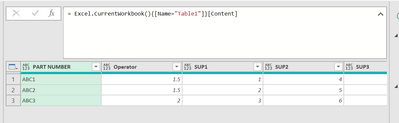
I have been able to achieve the first part like so:

kgiboin_0-1642609270088.png

by inserting this code:

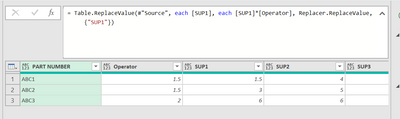
= Table.ReplaceValue(#"Source", each [SUP1], each [SUP1]*[Operator], Replacer.ReplaceValue, {"SUP1"})

I am able to change the value of SUP1 as below:

kgiboin_1-1642609365756.png


However I want to change the values of a range of columns, not just the SUP1 column. 

How do I change the replace value code to affect all the Columns in the table e.g SUP2 SUP3 SUP4... 

Thanks!


2 ACCEPTED SOLUTIONS
BA_Pete
Super User
Super User

Hi @Anonymous ,


In your current data format, you would not be able to apply this to multiple columns at the same time - you would need to create a new replace step for each [SUP2], [SUP3] etc.


However, you should really unpivot your SUP columns (multi-select [PART NUMBER] and [Operator] then Transform tab > Unpivot Columns (dropdown) > Unpivot Other Columns).

This will firstly allow you to perform your multiplication replacement step generically on a single column ([Value]), but also restructure your data into the most efficient format for reporting.


Pete


Now accepting Kudos! If my post helped you, why not give it a thumbs-up?

Proud to be a Datanaut!


View solution in original post

Unpivoting is definitely the best way to go but it is possible to do multiple columns simultaneously even without explicitly referencing each one if you do some fancy row transformations.


Table.FromRecords(
    Table.TransformRows(
        #"Previous Step Name",
        (row) => Record.TransformFields(
                     row,
                     List.Transform(
                         List.Skip(Record.FieldNames(row), 2),
                         (name) => {name, each Record.Field(row, name) * row[Operator]}
                     )
                 )
    )
)


View solution in original post

3 REPLIES 3
Anonymous
Not applicable

I found another way to do it without unpivoting:


= Table.FromRecords(Table.TransformRows(#"previous step name",(row) => Record.TransformFields(row,List.Transform(List.Skip(Record.FieldNames(row), [enter the nth column you want the formula to start]),(name) => {name, each Record.Field(row, name) * row[#"Operator"]}))))

BA_Pete
Super User
Super User

Hi @Anonymous ,


In your current data format, you would not be able to apply this to multiple columns at the same time - you would need to create a new replace step for each [SUP2], [SUP3] etc.


However, you should really unpivot your SUP columns (multi-select [PART NUMBER] and [Operator] then Transform tab > Unpivot Columns (dropdown) > Unpivot Other Columns).

This will firstly allow you to perform your multiplication replacement step generically on a single column ([Value]), but also restructure your data into the most efficient format for reporting.


Pete


Now accepting Kudos! If my post helped you, why not give it a thumbs-up?

Proud to be a Datanaut!


Unpivoting is definitely the best way to go but it is possible to do multiple columns simultaneously even without explicitly referencing each one if you do some fancy row transformations.


Table.FromRecords(
    Table.TransformRows(
        #"Previous Step Name",
        (row) => Record.TransformFields(
                     row,
                     List.Transform(
                         List.Skip(Record.FieldNames(row), 2),
                         (name) => {name, each Record.Field(row, name) * row[Operator]}
                     )
                 )
    )
)


Helpful resources

Announcements
Fabric Data Days is here Carousel

Data Days 2026

Don't miss out on Data Days, June 15 through August 7. Learn Fabric, Power BI, SQL, AI and more.

Power BI DataViz World Championships carousel

Power BI DataViz World Championships - June 2026

A new Power BI DataViz World Championship is coming this June! Don't miss out on submitting your entry.