Don't miss your chance to take the Fabric Data Engineer (DP-700) exam on us!
Learn moreNext up in the FabCon + SQLCon recap series: The roadmap for Microsoft SQL and Maximizing Developer experiences in Fabric. All sessions are available on-demand after the live show. Register now
Hi,
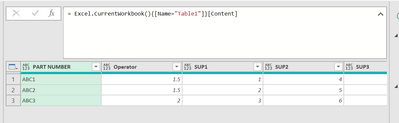
I have been able to achieve the first part like so:
by inserting this code:
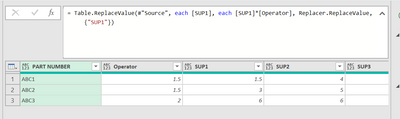
= Table.ReplaceValue(#"Source", each [SUP1], each [SUP1]*[Operator], Replacer.ReplaceValue, {"SUP1"})
I am able to change the value of SUP1 as below:
However I want to change the values of a range of columns, not just the SUP1 column.
How do I change the replace value code to affect all the Columns in the table e.g SUP2 SUP3 SUP4...
Thanks!
Solved! Go to Solution.
Hi @Anonymous ,
In your current data format, you would not be able to apply this to multiple columns at the same time - you would need to create a new replace step for each [SUP2], [SUP3] etc.
However, you should really unpivot your SUP columns (multi-select [PART NUMBER] and [Operator] then Transform tab > Unpivot Columns (dropdown) > Unpivot Other Columns).
This will firstly allow you to perform your multiplication replacement step generically on a single column ([Value]), but also restructure your data into the most efficient format for reporting.
Pete
Proud to be a Datanaut!
Unpivoting is definitely the best way to go but it is possible to do multiple columns simultaneously even without explicitly referencing each one if you do some fancy row transformations.
Table.FromRecords(
Table.TransformRows(
#"Previous Step Name",
(row) => Record.TransformFields(
row,
List.Transform(
List.Skip(Record.FieldNames(row), 2),
(name) => {name, each Record.Field(row, name) * row[Operator]}
)
)
)
)
I found another way to do it without unpivoting:
= Table.FromRecords(Table.TransformRows(#"previous step name",(row) => Record.TransformFields(row,List.Transform(List.Skip(Record.FieldNames(row), [enter the nth column you want the formula to start]),(name) => {name, each Record.Field(row, name) * row[#"Operator"]}))))
Hi @Anonymous ,
In your current data format, you would not be able to apply this to multiple columns at the same time - you would need to create a new replace step for each [SUP2], [SUP3] etc.
However, you should really unpivot your SUP columns (multi-select [PART NUMBER] and [Operator] then Transform tab > Unpivot Columns (dropdown) > Unpivot Other Columns).
This will firstly allow you to perform your multiplication replacement step generically on a single column ([Value]), but also restructure your data into the most efficient format for reporting.
Pete
Proud to be a Datanaut!
Unpivoting is definitely the best way to go but it is possible to do multiple columns simultaneously even without explicitly referencing each one if you do some fancy row transformations.
Table.FromRecords(
Table.TransformRows(
#"Previous Step Name",
(row) => Record.TransformFields(
row,
List.Transform(
List.Skip(Record.FieldNames(row), 2),
(name) => {name, each Record.Field(row, name) * row[Operator]}
)
)
)
)
If you have recently started exploring Fabric, we'd love to hear how it's going. Your feedback can help with product improvements.
A new Power BI DataViz World Championship is coming this June! Don't miss out on submitting your entry.
Share feedback directly with Fabric product managers, participate in targeted research studies and influence the Fabric roadmap.
| User | Count |
|---|---|
| 6 | |
| 4 | |
| 3 | |
| 3 | |
| 2 |