Don't miss your chance to take the Fabric Data Engineer (DP-700) exam on us!
Learn moreWe've captured the moments from FabCon & SQLCon that everyone is talking about, and we are bringing them to the community, live and on-demand. Starts on April 14th. Register now
I want to transfrom the data as mentioned below, is there any way I could achieve this either in powerquery or either in front end
| Week | Material | SALES | PROFIT | Discount | Week | Material | SALES | PROFIT | Discount | |
| 1 | A | 3 | 2 | 4 | 1 | A | 11 | |||
| 1 | B | 4 | 1 | 5 | 2 | A | 11 | |||
| 1 | C | 3 | 3 | 6 | 3 | A | 11 | |||
| 1 | D | 3 | 4 | 6 | 4 | A | 22 | |||
| 1 | E | 6 | 5 | 7 | 5 | A | 22 | |||
| 1 | F | 7 | 6 | 7 | 6 | A | 33 | |||
| 7 | A | 33 | ||||||||
| 8 | A | 33 | ||||||||
| 9 | A | 33 | ||||||||
| 1 | B | 11 | ||||||||
| 2 | B | 11 | ||||||||
| 3 | B | 11 | ||||||||
| 4 | B | 11 | ||||||||
| 5 | B | 22 | ||||||||
| 6 | B | 33 | ||||||||
| 7 | B | 33 | ||||||||
| 8 | B | 33 | ||||||||
| 9 | B | 33 | ||||||||
| 10 | B | 33 |
Hi @Legend_11 ,
Can you explain the logic of how to get from table1 to table2 please?
I can't see any type of pattern between the data in each table.
Pete
Proud to be a Datanaut!
for example I will take first row,
Material A has 3 sales, I want to split the rows to 3 and also add+1 to the week , nexxt profit has to come two rows (numbers 11,22,33 are just random int i am using) + continue the addition of week
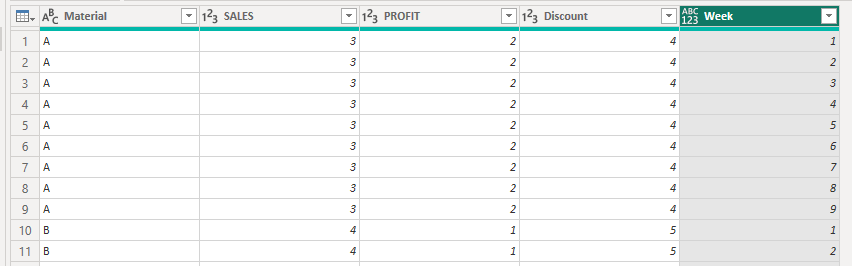
Ok. You can create and expand a list that runs from 1 to the sum of [SALES], [PROFIT], and [Discount], like this:
let
Source = Table.FromRows(Json.Document(Binary.Decompress(Binary.FromText("i45WclTSUTIGYiMgNlGK1YlWcgKzdJQMgdgULOIMVQPCZmARFyjPBC7iCmaBdOgomYNF3MAsiChQJBYA", BinaryEncoding.Base64), Compression.Deflate)), let _t = ((type nullable text) meta [Serialized.Text = true]) in type table [Material = _t, SALES = _t, PROFIT = _t, Discount = _t]),
chgTypes = Table.TransformColumnTypes(Source,{{"Material", type text}, {"SALES", Int64.Type}, {"PROFIT", Int64.Type}, {"Discount", Int64.Type}}),
addWeek = Table.AddColumn(chgTypes, "Week", each {1..List.Sum({[SALES],[PROFIT],[Discount]})}),
expandWeek = Table.ExpandListColumn(addWeek, "Week")
in
expandWeek
Output:
Pete
Proud to be a Datanaut!
If you have recently started exploring Fabric, we'd love to hear how it's going. Your feedback can help with product improvements.
A new Power BI DataViz World Championship is coming this June! Don't miss out on submitting your entry.
Share feedback directly with Fabric product managers, participate in targeted research studies and influence the Fabric roadmap.
| User | Count |
|---|---|
| 5 | |
| 3 | |
| 3 | |
| 2 | |
| 2 |
| User | Count |
|---|---|
| 9 | |
| 8 | |
| 7 | |
| 5 | |
| 5 |