Join us at FabCon Atlanta from March 16 - 20, 2026, for the ultimate Fabric, Power BI, AI and SQL community-led event. Save $200 with code FABCOMM.
Register now!Vote for your favorite vizzies from the Power BI Dataviz World Championship submissions. Vote now!
I want to transfrom the data as mentioned below, is there any way I could achieve this either in powerquery or either in front end
| Week | Material | SALES | PROFIT | Discount | Week | Material | SALES | PROFIT | Discount | |
| 1 | A | 3 | 2 | 4 | 1 | A | 11 | |||
| 1 | B | 4 | 1 | 5 | 2 | A | 11 | |||
| 1 | C | 3 | 3 | 6 | 3 | A | 11 | |||
| 1 | D | 3 | 4 | 6 | 4 | A | 22 | |||
| 1 | E | 6 | 5 | 7 | 5 | A | 22 | |||
| 1 | F | 7 | 6 | 7 | 6 | A | 33 | |||
| 7 | A | 33 | ||||||||
| 8 | A | 33 | ||||||||
| 9 | A | 33 | ||||||||
| 1 | B | 11 | ||||||||
| 2 | B | 11 | ||||||||
| 3 | B | 11 | ||||||||
| 4 | B | 11 | ||||||||
| 5 | B | 22 | ||||||||
| 6 | B | 33 | ||||||||
| 7 | B | 33 | ||||||||
| 8 | B | 33 | ||||||||
| 9 | B | 33 | ||||||||
| 10 | B | 33 |
Hi @Legend_11 ,
Can you explain the logic of how to get from table1 to table2 please?
I can't see any type of pattern between the data in each table.
Pete
Proud to be a Datanaut!
for example I will take first row,
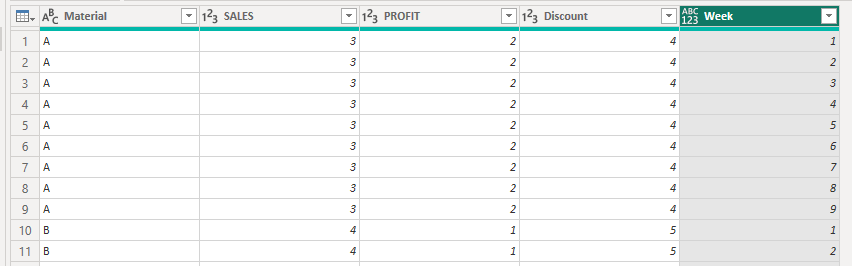
Material A has 3 sales, I want to split the rows to 3 and also add+1 to the week , nexxt profit has to come two rows (numbers 11,22,33 are just random int i am using) + continue the addition of week
Ok. You can create and expand a list that runs from 1 to the sum of [SALES], [PROFIT], and [Discount], like this:
let
Source = Table.FromRows(Json.Document(Binary.Decompress(Binary.FromText("i45WclTSUTIGYiMgNlGK1YlWcgKzdJQMgdgULOIMVQPCZmARFyjPBC7iCmaBdOgomYNF3MAsiChQJBYA", BinaryEncoding.Base64), Compression.Deflate)), let _t = ((type nullable text) meta [Serialized.Text = true]) in type table [Material = _t, SALES = _t, PROFIT = _t, Discount = _t]),
chgTypes = Table.TransformColumnTypes(Source,{{"Material", type text}, {"SALES", Int64.Type}, {"PROFIT", Int64.Type}, {"Discount", Int64.Type}}),
addWeek = Table.AddColumn(chgTypes, "Week", each {1..List.Sum({[SALES],[PROFIT],[Discount]})}),
expandWeek = Table.ExpandListColumn(addWeek, "Week")
in
expandWeek
Output:
Pete
Proud to be a Datanaut!
Vote for your favorite vizzies from the Power BI World Championship submissions!
If you love stickers, then you will definitely want to check out our Community Sticker Challenge!
Check out the January 2026 Power BI update to learn about new features.
| User | Count |
|---|---|
| 10 | |
| 10 | |
| 8 | |
| 7 | |
| 6 |