cancel
Showing results for 
Search instead for 
Did you mean: 

We've captured the moments from FabCon & SQLCon that everyone is talking about, and we are bringing them to the community, live and on-demand. Starts on April 14th. Register now

Reply
Anonymous
Not applicable

Transform Data Table - Extract Data from Existing Column and Return New Column

Hello Community,

I am new to Power Query and am trying to use some of my existing data to create a modified version of it.

I would like to use my existing table to create a new column (or new table). Any options of a solution are much appreciated.


Example


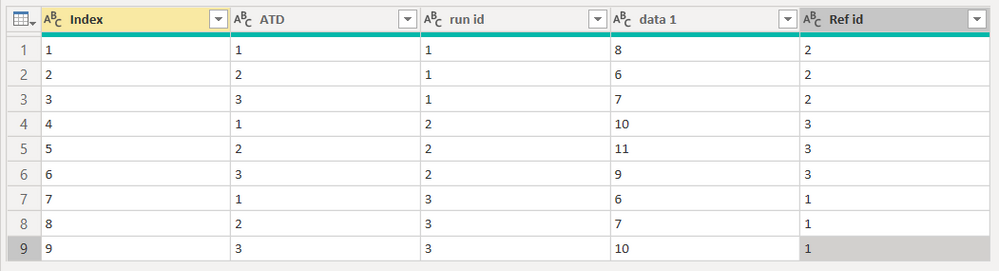
Current Data Tabledatatable.PNG


I am trying to use the data in the table to return a column named [ref data] (not shown).

In this table the [ref id] is used to describe what [run id] to retrieve data for, such as in row 1 [run id] 1 would be compared to [run id] 2. The compares would be performed on a matching [ATD].

The [ref data] column needs to return the [data 1] for the matching [ATD] and [Ref id].

The expected results for the column in this example would be;

10

11

9

6

7

10

8

6

7


Thanks!!

1 ACCEPTED SOLUTION
Stachu
Community Champion
Community Champion

you can use Merge for that, merging with current table, with following joins (you add second and more joins by clicking on a column with Ctrl pressed):
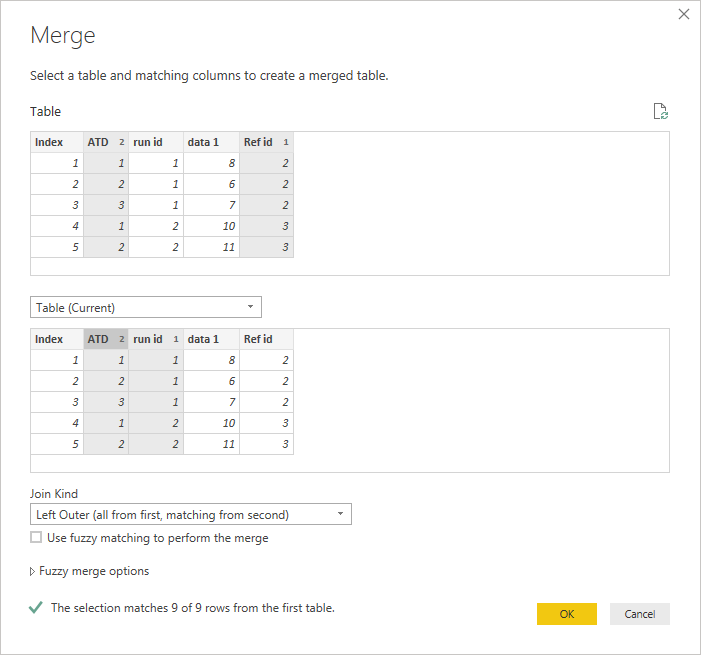
Capture.PNG

you can then expand the relevant column and rename it properly

you can also see how it works with this M query

let
    Source = Table.FromRows(Json.Document(Binary.Decompress(Binary.FromText("Pc3LDcAwCAPQXThzKKH5zYKy/xoB6nJwFD1Z2IyEuLI8jQ6bv5wJHaXqP4XO0heS/ScrwR2ULMUDN4J36cQNxZ6kLvQUe59uiP57zucC", BinaryEncoding.Base64), Compression.Deflate)), let _t = ((type text) meta [Serialized.Text = true]) in type table [Index = _t, ATD = _t, #"run id" = _t, #"data 1" = _t, #"Ref id" = _t]),
    #"Changed Type" = Table.TransformColumnTypes(Source,{{"Index", Int64.Type}, {"ATD", Int64.Type}, {"run id", Int64.Type}, {"data 1", Int64.Type}, {"Ref id", Int64.Type}}),
    #"Merged Queries" = Table.NestedJoin(#"Changed Type", {"Ref id", "ATD"}, #"Changed Type", {"run id", "ATD"}, "Changed Type", JoinKind.LeftOuter),
    #"Expanded Changed Type" = Table.ExpandTableColumn(#"Merged Queries", "Changed Type", {"data 1"}, {"Changed Type.data 1"}),
    #"Renamed Columns" = Table.RenameColumns(#"Expanded Changed Type",{{"Changed Type.data 1", "Ref data"}})
in
    #"Renamed Columns"


Did I answer your question? Mark my post as a solution!
Thank you for the kudos 🙂

View solution in original post

2 REPLIES 2
Stachu
Community Champion
Community Champion

you can use Merge for that, merging with current table, with following joins (you add second and more joins by clicking on a column with Ctrl pressed):
Capture.PNG

you can then expand the relevant column and rename it properly

you can also see how it works with this M query

let
    Source = Table.FromRows(Json.Document(Binary.Decompress(Binary.FromText("Pc3LDcAwCAPQXThzKKH5zYKy/xoB6nJwFD1Z2IyEuLI8jQ6bv5wJHaXqP4XO0heS/ScrwR2ULMUDN4J36cQNxZ6kLvQUe59uiP57zucC", BinaryEncoding.Base64), Compression.Deflate)), let _t = ((type text) meta [Serialized.Text = true]) in type table [Index = _t, ATD = _t, #"run id" = _t, #"data 1" = _t, #"Ref id" = _t]),
    #"Changed Type" = Table.TransformColumnTypes(Source,{{"Index", Int64.Type}, {"ATD", Int64.Type}, {"run id", Int64.Type}, {"data 1", Int64.Type}, {"Ref id", Int64.Type}}),
    #"Merged Queries" = Table.NestedJoin(#"Changed Type", {"Ref id", "ATD"}, #"Changed Type", {"run id", "ATD"}, "Changed Type", JoinKind.LeftOuter),
    #"Expanded Changed Type" = Table.ExpandTableColumn(#"Merged Queries", "Changed Type", {"data 1"}, {"Changed Type.data 1"}),
    #"Renamed Columns" = Table.RenameColumns(#"Expanded Changed Type",{{"Changed Type.data 1", "Ref data"}})
in
    #"Renamed Columns"


Did I answer your question? Mark my post as a solution!
Thank you for the kudos 🙂
Anonymous
Not applicable

@Stachu ,

Thanks for the help, this is what I was looking for.

Helpful resources

Announcements
New to Fabric survey Carousel

New to Fabric Survey

If you have recently started exploring Fabric, we'd love to hear how it's going. Your feedback can help with product improvements.

Power BI DataViz World Championships carousel

Power BI DataViz World Championships - June 2026

A new Power BI DataViz World Championship is coming this June! Don't miss out on submitting your entry.

Join our Fabric User Panel

Join our Fabric User Panel

Share feedback directly with Fabric product managers, participate in targeted research studies and influence the Fabric roadmap.

March Power BI Update Carousel

Power BI Community Update - March 2026

Check out the March 2026 Power BI update to learn about new features.