Join us at FabCon Atlanta from March 16 - 20, 2026, for the ultimate Fabric, Power BI, AI and SQL community-led event. Save $200 with code FABCOMM.
Register now!The Power BI Data Visualization World Championships is back! Get ahead of the game and start preparing now! Learn more
Hello Community,
I am new to Power Query and am trying to use some of my existing data to create a modified version of it.
I would like to use my existing table to create a new column (or new table). Any options of a solution are much appreciated.
Example
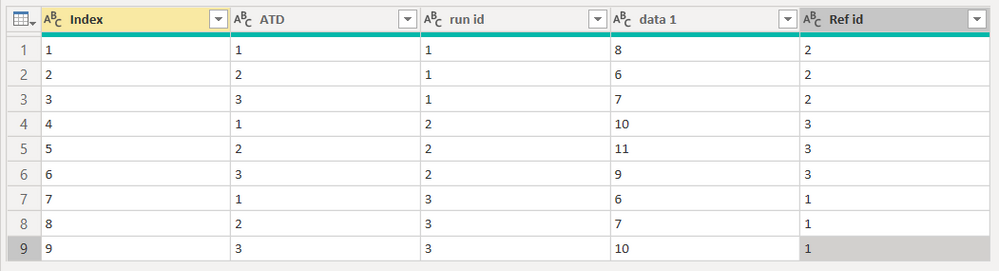
Current Data Table
I am trying to use the data in the table to return a column named [ref data] (not shown).
In this table the [ref id] is used to describe what [run id] to retrieve data for, such as in row 1 [run id] 1 would be compared to [run id] 2. The compares would be performed on a matching [ATD].
The [ref data] column needs to return the [data 1] for the matching [ATD] and [Ref id].
The expected results for the column in this example would be;
10
11
9
6
7
10
8
6
7
Thanks!!
Solved! Go to Solution.
you can use Merge for that, merging with current table, with following joins (you add second and more joins by clicking on a column with Ctrl pressed):
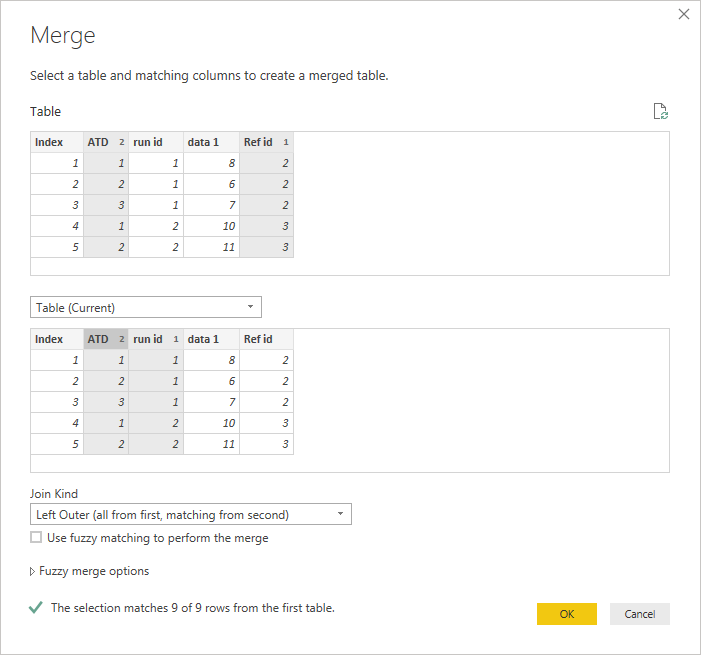
you can then expand the relevant column and rename it properly
you can also see how it works with this M query
let
Source = Table.FromRows(Json.Document(Binary.Decompress(Binary.FromText("Pc3LDcAwCAPQXThzKKH5zYKy/xoB6nJwFD1Z2IyEuLI8jQ6bv5wJHaXqP4XO0heS/ScrwR2ULMUDN4J36cQNxZ6kLvQUe59uiP57zucC", BinaryEncoding.Base64), Compression.Deflate)), let _t = ((type text) meta [Serialized.Text = true]) in type table [Index = _t, ATD = _t, #"run id" = _t, #"data 1" = _t, #"Ref id" = _t]),
#"Changed Type" = Table.TransformColumnTypes(Source,{{"Index", Int64.Type}, {"ATD", Int64.Type}, {"run id", Int64.Type}, {"data 1", Int64.Type}, {"Ref id", Int64.Type}}),
#"Merged Queries" = Table.NestedJoin(#"Changed Type", {"Ref id", "ATD"}, #"Changed Type", {"run id", "ATD"}, "Changed Type", JoinKind.LeftOuter),
#"Expanded Changed Type" = Table.ExpandTableColumn(#"Merged Queries", "Changed Type", {"data 1"}, {"Changed Type.data 1"}),
#"Renamed Columns" = Table.RenameColumns(#"Expanded Changed Type",{{"Changed Type.data 1", "Ref data"}})
in
#"Renamed Columns"
you can use Merge for that, merging with current table, with following joins (you add second and more joins by clicking on a column with Ctrl pressed):
you can then expand the relevant column and rename it properly
you can also see how it works with this M query
let
Source = Table.FromRows(Json.Document(Binary.Decompress(Binary.FromText("Pc3LDcAwCAPQXThzKKH5zYKy/xoB6nJwFD1Z2IyEuLI8jQ6bv5wJHaXqP4XO0heS/ScrwR2ULMUDN4J36cQNxZ6kLvQUe59uiP57zucC", BinaryEncoding.Base64), Compression.Deflate)), let _t = ((type text) meta [Serialized.Text = true]) in type table [Index = _t, ATD = _t, #"run id" = _t, #"data 1" = _t, #"Ref id" = _t]),
#"Changed Type" = Table.TransformColumnTypes(Source,{{"Index", Int64.Type}, {"ATD", Int64.Type}, {"run id", Int64.Type}, {"data 1", Int64.Type}, {"Ref id", Int64.Type}}),
#"Merged Queries" = Table.NestedJoin(#"Changed Type", {"Ref id", "ATD"}, #"Changed Type", {"run id", "ATD"}, "Changed Type", JoinKind.LeftOuter),
#"Expanded Changed Type" = Table.ExpandTableColumn(#"Merged Queries", "Changed Type", {"data 1"}, {"Changed Type.data 1"}),
#"Renamed Columns" = Table.RenameColumns(#"Expanded Changed Type",{{"Changed Type.data 1", "Ref data"}})
in
#"Renamed Columns"
The Power BI Data Visualization World Championships is back! Get ahead of the game and start preparing now!
| User | Count |
|---|---|
| 19 | |
| 10 | |
| 9 | |
| 7 | |
| 6 |